
 Hyundai Azera: Answering Calls
Answering a Call
Answering a call with a Bluetooth® Wireless Technology device connected will display the following screen.
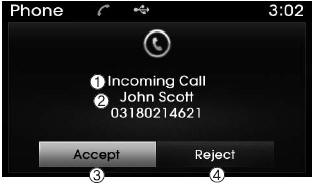
1) Caller : Displays the other party’s name when the incoming caller is saved
within your contacts
2) Incoming Number : Displays the incoming number
3) Accept : Accept the incoming call 4) Reject : Reject the incoming call
✽ NOTICE
- When an incoming call pop-up is displayed, most Audio and SETUP mode features are disabled. Only the call volume will operate.
- The telephone number may not be properly displayed in some mobile phones.
- When a call is answered with the mobile phone, the call mode will automatically revert to Private mode.
During a Handsfree Call
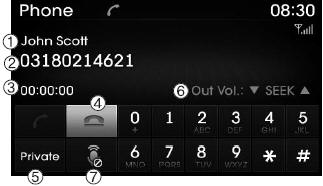
1) Caller : Displays the other party’s name if the incoming caller is saved within
your contacts
2) Incoming Number : Displays the incoming number
3) Call time : Displays the call time
4) End : Ends call
5) Private : Converts to Private mode
6) Out Vol. : Sets call volume as heard by the other party
7) Mute : Turns Mic Mute On/Off
✽ NOTICE
If the mic is muted, the other party will not be able to hear your voice.
 Calling by Dialing a Number
Press the key
Select [Dial Number]
1) Dial Pad : Used to enter phone number
2) Call : If a number has been entered, calls the number If no number has been entered,
switches to call history scre ...
 Call History
Press the key
Select [Call History]
A list of incoming, outgoing and missed calls is displayed.
Select the button to download the
call history.
1) Call History :
- Displays recent calls (ca ...
See also:
Components and Components Location
Component Location
1. Hood switch2. Burglar horn3. IPM and RF antenna4. Key warning switch5. Front door switch6. Front door lock actuator & switch7. Rear door lock actuator & switch8. Rea ...
Roll Blind Repair procedures
Removal
1.
Remove the roof trim.
(Refer to Roof Trim - "Roof Trim Assembly")
2.
After loosening the mounting screws, then remove the roll blind lower bracket (A).
3.
Remove the roll blind ...
Map lamp
,
Push the switch (1) to turn the map lamp on or off. This light produces a spot
beam for convenient use as a map lamp at night or as a personal lamp for the driver
and the fro ...
Categories
Hyundai Azera Manuals
