
 Hyundai Azera: AVN Head Unit Components and Components Location
Fifth generation HG (2011–2026) / Hyundai Azera 2011-2026 Service Manual / Body Electrical System / AVN System / AVN Head Unit Components and Components Location
Hyundai Azera: AVN Head Unit Components and Components Location
Fifth generation HG (2011–2026) / Hyundai Azera 2011-2026 Service Manual / Body Electrical System / AVN System / AVN Head Unit Components and Components Location
Fifth generation HG (2011–2026) / Hyundai Azera 2011-2026 Service Manual / Body Electrical System / AVN System / AVN Head Unit Components and Components Location
| Components |
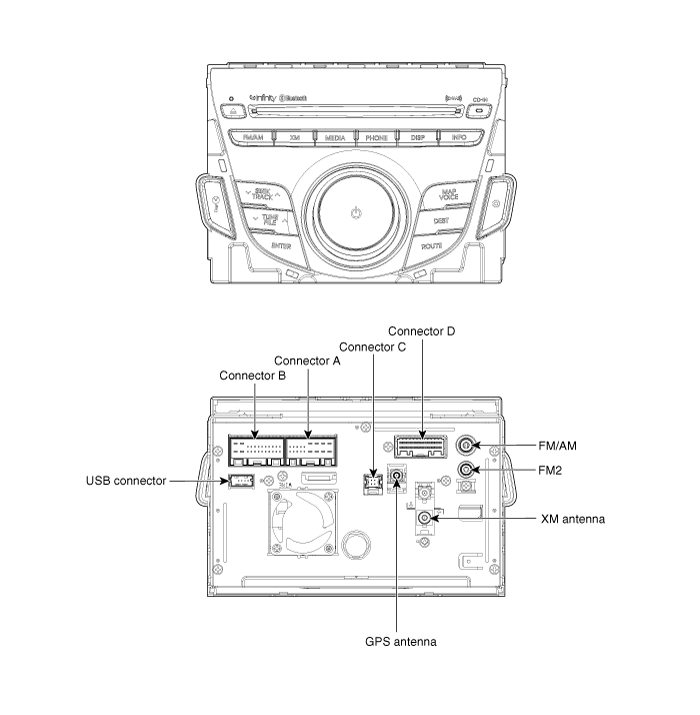
| AVN (A/V & Navigation) Head Unit Connector |
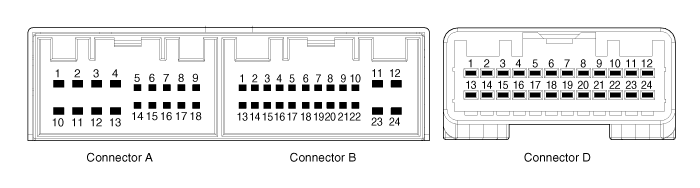
| Pin No. | Description | Comments |
| A1 | - | - |
| A2 | PARKING_V_VIDEO | Rear View Camera Video Signal |
| A3 | PARKING_V_GND | Rear View Camera Video Ground |
| A4 | R/C_SHIELD GND | Rear View Camera Video Shield Ground |
| A5 | SPDIF GND | SPDIF DIGITAL SIGNAL GND |
| A6 | SPDIF + | SPDIF DIGITAL SIGNAL POSITIVE |
| A7 | - | ALT Signal |
| A8 | ILL+ | Rheostat from vehicle + |
| A9 | R_POSITON | R Positon(TGS) signal from Vehicle |
| A10 | - | - |
| A11 | R/C POWER | Rear View Camera Power |
| A12 | NAVI_VOICE- | Navigation Voice channel - |
| A13 | NAVI_VOICE+ | Navigation Voice channel + |
| A14 | PGS/RC | PGS or AVM == GND / RC == No connection |
| A15 | SPDIF - | SPDIF DIGITAL SIGNAL NEGAITIVE |
| A16 | DR KEY UNLOCK | Door Unlock Signal |
| A17 | ILL- | Rheostat from vehicle - |
| A18 | REMOT ANT | Remote supply for motorised antenna |
| B1 | MM CAN HIGH | MM CAN-H I/F |
| B2 | NC (TEL_MUTE) | TELEPHONE MUTE |
| B3 | NC (TEMP) | Temp signal from vehicle |
| B4 | - | STEEL WHEEL REMOTE CONTROL INPUT |
| B5 | - | REAR REMOTE CONTROL INPUT |
| B6 | - | - |
| B7 | AUX_VIDEO | AUX Video Signal |
| B8 | AUX_R_IN | AUX ST SOUND R-CH INPUT |
| B9 | AUX GND | AUX ST SOUND GND |
| B10 | MIC+ | BLUETOOTH H/F VOICE INPUT PIN |
| B11 | ACC | ACC |
| B12 | B+ | Fused battery power supply (10A) |
| B13 | MM CAN LOW | CAN-L I/F |
| B14 | AUTO LIGHT | Automatic Light Signal from Vehicle |
| B15 | P_POSITION | P Positon(TGS) signal from Vehicle |
| B16 | SPEED | Speed signal from vehicle |
| B17 | - | REMOTE CONTROL GND |
| B18 | - | - |
| B19 | AUX_VIDEO_GND | AUX Video Signal GND |
| B20 | AUX_DETECT | AUX CONNECTION DETECT |
| B21 | AUX_L_IN | AUX ST SOUND L-CH INPUT |
| B22 | MIC- | BLUETOOTH H/F VOICE INPUT GND |
| B23 | POWER GND | Ground of Power Supply Line |
| B24 | POWER GND | Ground of Power Supply Line |
| D1 | - | - |
| D2 | - | - |
| D3 | - | - |
| D4 | - | - |
| D5 | - | - |
| D6 | - | - |
| D7 | - | - |
| D8 | - | - |
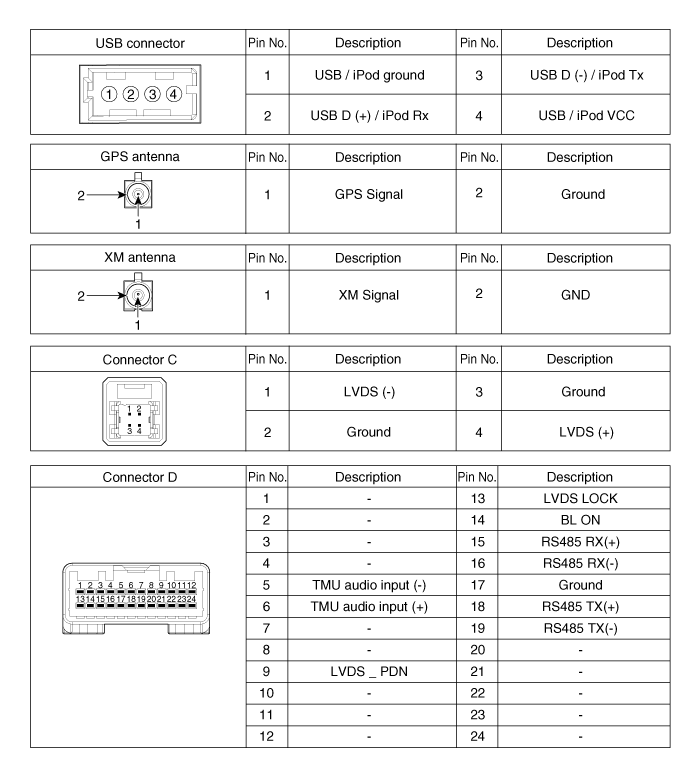
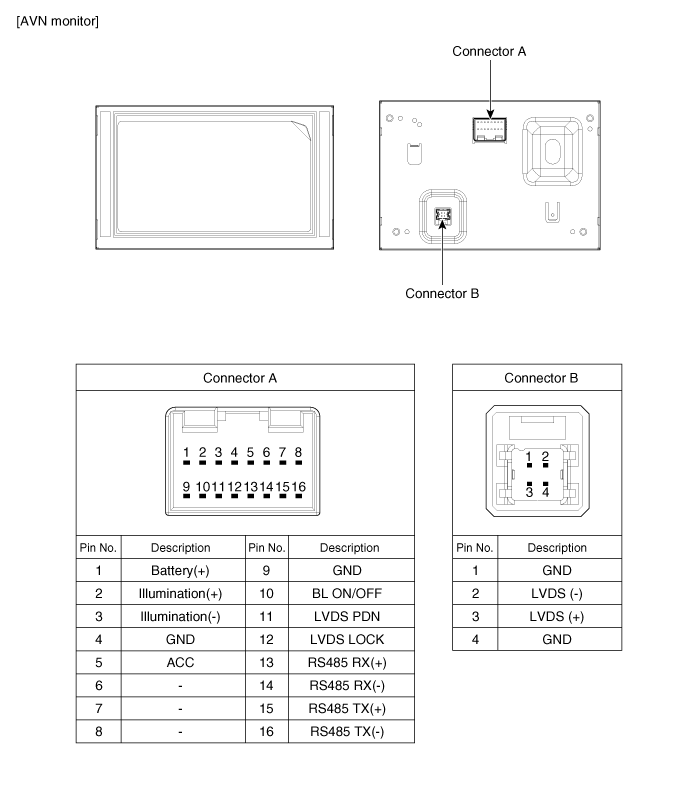
| D9 | LVDS_PDN | Communication between H/UNIT and Monitor |
| D10 | - | - |
| D11 | - | - |
| D12 | - | - |
| D13 | LVDS_LOCK | Communication between H/UNIT and Monitor |
| D14 | BL_ON | Communication between H/UNIT and Monitor |
| D15 | RS485_RX+ | Communication between H/UNIT and Monitor |
| D16 | RS485_RX- | Communication between H/UNIT and Monitor |
| D17 | GND | Ground of Power Supply Line |
| D18 | RS485_TX- | Communication between H/UNIT and Monitor |
| D19 | RS485_TX+ | Communication between H/UNIT and Monitor |
| D20 | - | - |
| D21 | - | - |
| D22 | - | - |
| D23 | - | - |
| D24 | - | - |
 Description and Operation
Description
Communication network diagram
AbbreviationExplanationC_CANChassis Controller Area NetworkB_CANBody Controller Area NetworkMM_CANMulti media Controller Area NetworkSMKSmart Key ECUDDM ...
 AVN Head Unit Repair procedures
Removal
AVN Head Unit
•
Take care not to scratch the center fascia panel and related parts.
•
Eject all the disc before removing the AVN head unit to prevent dam ...
See also:
Troubleshooting
Troubleshooting
SymptomPossible causeRemedySpeedometer does not operateCluster fuse (10A) blownCheck for short and replace fuseSpeedometer faultyCheck speedometerCAN line faultyCheck the TCUWirin ...
Oil Pump Components and Components Location
Components
1. Reaction shaft support assembly2. Oil pump housing3. Driven gear4. Drive gear5. Oil seal6. Bush-Housing7. Reaction shaft8. Bush- Reaction shaft9. Sleeve10. Bolt
Oil Pump Operatio ...
Steering gear box, linkage & boots/lower arm ball joint
With the vehicle stopped and engine off, check for excessive free-play in the
steering wheel.
Check the linkage for bends or damage. Check the dust boots and ball joints for
deterioration, cracks, ...
Categories
Hyundai Azera Manuals

© 2011-2026 Copyright www.hgmanual.com