
 Hyundai Azera: Basic Mode Screen
Fifth generation HG (2011–2026) / Hyundai Azera 2011-2026 Owners Manual / Features of your vehicle / XM Radio mode / Basic Mode Screen
Hyundai Azera: Basic Mode Screen
Fifth generation HG (2011–2026) / Hyundai Azera 2011-2026 Owners Manual / Features of your vehicle / XM Radio mode / Basic Mode Screen
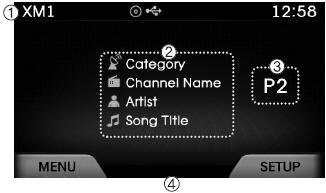
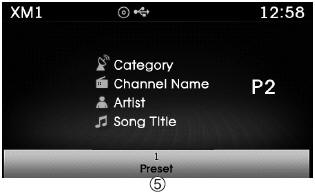
(1) Mode Display Displays currently operating mode.
(2) Channel Information Displays the category, channel number, channel name, artist and song title.
(3) Preset Displays currently playing preset number [1] ~ [6].
(4) MENU Displays XM Radio menus.
(5) Preset Display Displays saved presets.
 XM Radio mode
...
 Using SEEK
Press the keys to play the previous/next
channel.
❈ If the “Categoryâ€� icon is displayed, channels are changed within the current
category. ...
See also:
Coolant
The coolant should be changed at the intervals specified in the maintenance schedule. ...
Operating door locks from outside the vehicle
With the smart key
Doors can be locked and unlocked pressing the switch of the outside door
handle with the smart key in your possession.
Doors can be locked and unlocked by pressing the butto ...
Deleting a Device
Press the key
Select [Phone]
Select [Paired Phone List]
From the paired phone list, select the device you want to delete and select the
button.
✽ NOTICE
When deleting the current ...
Categories
Hyundai Azera Manuals
