
 Hyundai Azera: Front Seat Cushion Cover Repair procedures
Fifth generation HG (2011–2026) / Hyundai Azera 2011-2026 Service Manual / Body (Interior and Exterior) / Front Seat / Front Seat Cushion Cover Repair procedures
Hyundai Azera: Front Seat Cushion Cover Repair procedures
Fifth generation HG (2011–2026) / Hyundai Azera 2011-2026 Service Manual / Body (Interior and Exterior) / Front Seat / Front Seat Cushion Cover Repair procedures
Fifth generation HG (2011–2026) / Hyundai Azera 2011-2026 Service Manual / Body (Interior and Exterior) / Front Seat / Front Seat Cushion Cover Repair procedures
| Replacement |
|

| 1. |
Remove the front seat shield inner cover.
(Refer to Front Seat - "Front Seat Shield Inner Cover") |
| 2. |
Remove the front seat shield outer cover.
(Refer to Front Seat - "Front Seat Shield Outer Cover") |
| 3. |
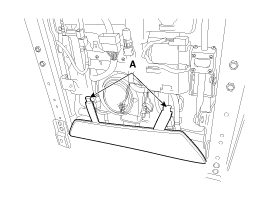
Remove the protector (A).
|
| 4. |
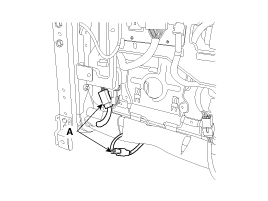
Disconnect the connectors (A).
|
| 5. |
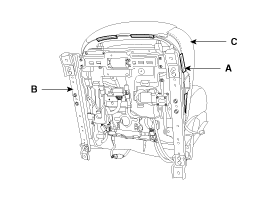
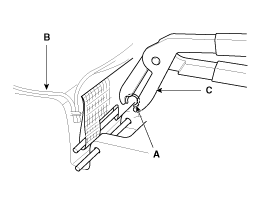
Push the protecter(A), and then front seat cushion cover (C) from the front seat frame (B).
|
| 6. |
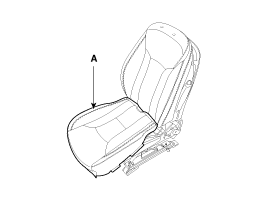
Remove the front seat cushion cover (A) from the front seat frame.
|
| 7. |
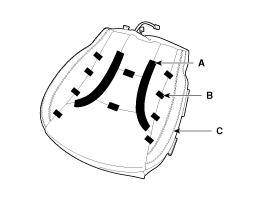
After removing the velcro tape (A) and hog-ring clips (B) on
the front of seat cushion and remove the front seat cushion cover (C).
|
| 8. |
Installation is the reverse of removal.
|

 Front Seat Cushion Cover Components and Components Location
Component Location
1. Front seat cushion cover
...
 Front Seat Frame Assembly Components and Components Location
Component Location
1. Front seat back frame assembly2. Front seat cushion frame assembly
...
See also:
Crankshaft Damper Pulley Repair procedures
Removal and Installation
•
Use fender covers to avoid damaging painted surfaces.
•
To avoid damage, unplug the wiring connectors carefully while holding the conn ...
Components and Components Location
Component Location
1. Cluster assembly2. Seat belt switch3. Vehicle speed sensor4. Water temperature gauge sender5. Oil pressure switch6. Brake oil level switch7. Parking brake switch8. Door swit ...
Tire pressure monitoring system
(1) Low tire pressure telltale / TPMS malfunction indicator
(2) Low tire pressure position telltale (Shown on the LCD display)
Each tire, including the spare (if provided), should be checked month ...
Categories
Hyundai Azera Manuals

© 2011-2026 Copyright www.hgmanual.com