
 Hyundai Azera: Telematics Unit (TMU) Repair procedures
Fifth generation HG (2011–2026) / Hyundai Azera 2011-2026 Service Manual / Body Electrical System / MTS System / Telematics Unit (TMU) Repair procedures
Hyundai Azera: Telematics Unit (TMU) Repair procedures
Fifth generation HG (2011–2026) / Hyundai Azera 2011-2026 Service Manual / Body Electrical System / MTS System / Telematics Unit (TMU) Repair procedures
Fifth generation HG (2011–2026) / Hyundai Azera 2011-2026 Service Manual / Body Electrical System / MTS System / Telematics Unit (TMU) Repair procedures
| Removal |
AVN Head Unit
|

| 1. |
Disconnect the negative (-) battery terminal. |
| 2. |
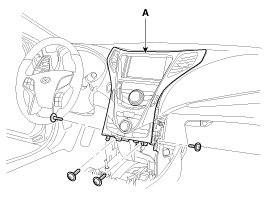
Remove the crash pad center fascia panel (A).
|
| 3. |
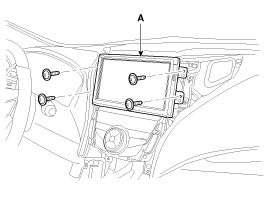
Remove the monitor (A) after loosening the mounting screws.
|
| 4. |
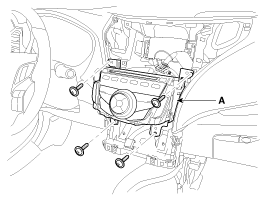
Remove the AVN head unit (A) after loosening the mounting screws.
|
| 5. |
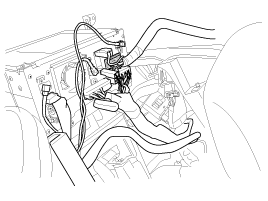
Remove the AVN head unit connectors and cables.
|
| 6. |
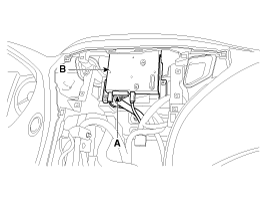
Disconnect the connectors (A) and loosen the screws (4EA), then remove the Telematics unit (B).
|
| Installation |
| 1. |
Install the Telematics unit. |
| 2. |
Install the the AVN head unit and the monitor unit. |
| 3. |
Install the the crash pad center fascia panel. |
| 4. |
Connect the negative (-) battery terminal. |
| Inspection |
| 1. |
After replacing the AVN, connect to "call center" by pushing the Blue Link button. |
| 2. |
If Blue Link service connected successfully, and then technician can hear the "Welcome to Hyundai Bluelink" sound.
|
 Telematics Unit (TMU) Components and Components Location
Component
...
 Microphone Repair procedures
Inspection
1.
Disconnect the negative(-) battery terminal.
2.
Remove the roof trim.
(Refer to Body - "Roof Trim Assembly")
3.
Remove the handsfree mic (A) after disconnect the connector f ...
See also:
Hood Latch Release Handle Components and Components Location
Component Location
1. Hood latch release handle
...
26 Brake Control Solenoid Valve(26/B_VFS) Repair procedures
Inspection
1.
Turn ignition switch OFF.
2.
Disconnect the solenoid valve connector.
3.
Measure resistance between sensor signal terminal and sensor ground terminal.
4.
Check that the ...
Rear Door Inside Handle Repair procedures
Replacement
1.
Remove the rear door trim.
(Refer to Rear Door - "Rear Door Trim")
2.
After loosening the mounting screws, then remove the rear door inside handle (A).
3.
Installation is t ...
Categories
Hyundai Azera Manuals

© 2011-2026 Copyright www.hgmanual.com