
 Hyundai Azera: MTS Antenna Repair procedures
Fifth generation HG (2011–2026) / Hyundai Azera 2011-2026 Service Manual / Body Electrical System / MTS System / MTS Antenna Repair procedures
Hyundai Azera: MTS Antenna Repair procedures
Fifth generation HG (2011–2026) / Hyundai Azera 2011-2026 Service Manual / Body Electrical System / MTS System / MTS Antenna Repair procedures
Fifth generation HG (2011–2026) / Hyundai Azera 2011-2026 Service Manual / Body Electrical System / MTS System / MTS Antenna Repair procedures
| Removal |
Roof Antenna (GPS)
| 1. |
Remove the rear roof trim.
|
| 2. |
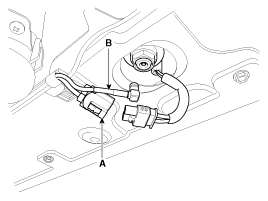
Disconnect the Connector(A) and cables (B) from the roof antenna.
|
| 3. |
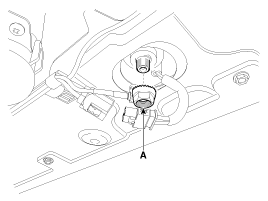
Remove the roof antenna after removing a nut(A).
|
| Installation |
Roof Antenna (GPS)
| 1. |
Install the roof antenna. |
| 2. |
Connect the GPS cable. |
| 3. |
Install the nut. |
| 4. |
Install the rear roof trim.
|

 MTS Antenna Components and Components Location
Components
...
 Smart key System
...
See also:
On-board Refueling Vapor Recovery (ORVR) valve Repair procedures
Removal
1.
Turn the ignition switch OFF, and then remove battery (-) cable.
2.
Remove the fuel tank.
(Refer to Fuel System - "Fuel Tank")
3.
Disconnect the vapor hose (A).
4.
Remove ...
Troubleshooting
Troubleshooting
SymptomSuspect AreaRemedy (Refer to page)Water leaks from sunroofDeteriorated roof lid weatherstripReplaceExcessive roof lid-to-body clearance and improperly fitted weatherstripAd ...
MEDIA MODE
Pressing the key will change the
operating mode in order of CD➟USB(iPod®)➟AUX➟My Music ➟ BT Audio.
If [Mode Pop up] is turned on within
[Display], then pressing t ...
Categories
Hyundai Azera Manuals

© 2011-2026 Copyright www.hgmanual.com