
 Hyundai Azera: Basic Mode Screen
Fifth generation HG (2011–2026) / Hyundai Azera 2011-2026 Owners Manual / Features of your vehicle / Audio CD Mode / Basic Mode Screen
Hyundai Azera: Basic Mode Screen
Fifth generation HG (2011–2026) / Hyundai Azera 2011-2026 Owners Manual / Features of your vehicle / Audio CD Mode / Basic Mode Screen
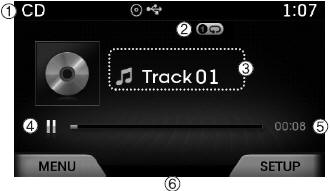
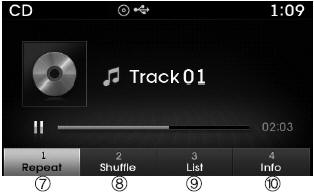
(1) Mode Displays currently operating mode.
(2) Operation State From Repeat / Shuffle / Scan, displays the currently operating function.
(3) Track Info Displays information about the current track.
(4) Play State Displays the play/pause state.
(5) Play Time Displays the current play time.
(6) MENU Displays the Audio CD Menu.
(7) Repeat Turns the Repeat feature on/off.
(8) Shuffle Turns the Shuffle feature on/off.
(9) List Moves to the list screen.
(10) Info Shows detailed information about the current track.
 Audio CD Mode
...

See also:
Cylinder Head Cover Repair procedures
Removal
[LH]
1.
Remove the Intake manifold.
(Refer to Intake And Exhaust System - "Intake Manifold")
2.
Remove the high pressure fuel pump.
(Refer to Fuel System - "High Pressure Fuel Pu ...
Canister Close Valve (CCV) Repair procedures
Inspection
1.
Turn the ignition switch OFF.
2.
Disconnect the CCV connector.
3.
Measure resistance between the CCV terminal 1 and 2.
4.
Check that the resistance is within the specific ...
Caring for disc
If the temperature inside the car is too high, open the car windows to ventilate
before using the system.
It is illegal to copy and use MP3/WMA files without permission. Use CDs
that are crea ...
Categories
Hyundai Azera Manuals
