
 Hyundai Azera: Pairing Key /
Key on the Steering Remote Controller
Fifth generation HG (2011–2026) / Hyundai Azera 2011-2026 Owners Manual / Features of your vehicle / Bluetooth® Wireless Technology Audio mode / Pairing Key /
Key on the Steering Remote Controller
Hyundai Azera: Pairing Key /
Key on the Steering Remote Controller
Fifth generation HG (2011–2026) / Hyundai Azera 2011-2026 Owners Manual / Features of your vehicle / Bluetooth® Wireless Technology Audio mode / Pairing Key /
Key on the Steering Remote Controller
When No Devices have been Paired
1. Press the  key or the
 key on the steering remote controller.
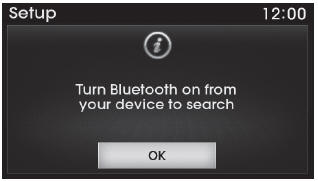
The following screen is displayed.
2. Select the  button to enter the
Pair Phone screen.
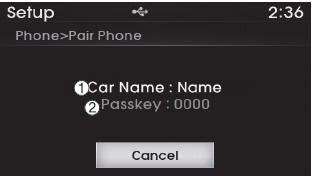
1) Car Name : Name of device as shown when searching from your Bluetooth® Wireless
Technology device
2) Passkey : Passkey used to pair the device
3. From your Bluetooth® Wireless Technology device (i.e. Mobile Phone), search and select your car audio system.
4. After a few moments, a screen is displayed where the passkey is entered.
Hear, enter the passkey “0000� to pair your Bluetooth® Wireless Technology device with the car audio system.
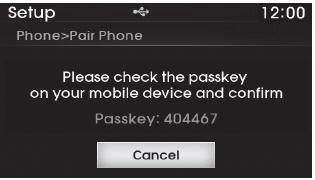
[SSP supported device] 4. After a few moments, a screen is displayed 6 digits passkey.
Hear, check the passkey on your Bluetooth® Wireless Technology device and confirm.
5. Once pairing is complete, the following screen is displayed.
✽ NOTICE
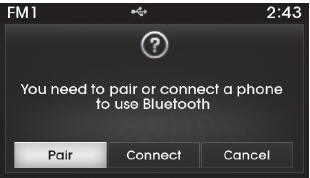
If Bluetooth® Wireless Technology devices are paired but none are currently
connected, pressing the  key or the
![the following screen. Press the [Pair] button to pair a new device or press the](images/books/6/1/page.h435.gif) key on the steering wheel displays
key on the steering wheel displays
the following screen. Press the [Pair] button to pair a new device or press the
[Connect] to connect a previously paired device.
 Pairing a Bluetooth® Wireless Technology Device
What is Bluetooth® Wireless Technology Pairing?
Pairing refers to the process of synchronizing your Bluetooth® Wireless Technology
phone or device with the car audio system for connection. Pairing ...
 Pairing through [PHONE] Setup
Press the key
Select [Phone]
Select [Pair Phone]
Select
TUNE knob
1.The following steps are the same as those described in the section "When No
Devices have been Paired&qu ...
See also:
On-board Refueling Vapor Recovery (ORVR) valve Repair procedures
Removal
1.
Turn the ignition switch OFF, and then remove battery (-) cable.
2.
Remove the fuel tank.
(Refer to Fuel System - "Fuel Tank")
3.
Disconnect the vapor hose (A).
4.
Remove ...
Closing the hood
1. Before closing the hood, check the following:
All filler caps in engine compartment must be correctly installed.
Gloves, rags or any other combustible material must be removed from the
engi ...
Trunk Lid Assembly Repair procedures
Replacement
•
When removing and installing the trunk lid, an assistant is necessary.
•
Wear gloves to protect hands from injury.
1.
After loosening the mou ...
Categories
Hyundai Azera Manuals
