
 Hyundai Azera: Answering Calls
Answering a Call
Answering a call with a Bluetooth® Wireless Technology device connected will display the following screen.
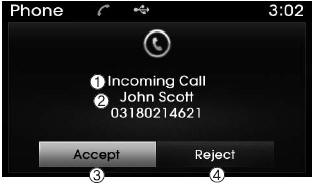
1) Caller : Displays the other party’s name when the incoming caller is saved
within your contacts
2) Incoming Number : Displays the incoming number
3) Accept : Accept the incoming call 4) Reject : Reject the incoming call
✽ NOTICE
- When an incoming call pop-up is displayed, most Audio and SETUP mode features are disabled. Only the call volume will operate.
- The telephone number may not be properly displayed in some mobile phones.
- When a call is answered with the mobile phone, the call mode will automatically revert to Private mode.
During a Handsfree Call
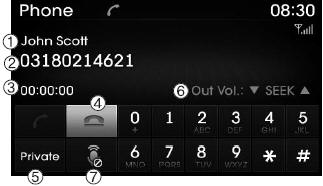
1) Caller : Displays the other party’s name if the incoming caller is saved within
your contacts
2) Incoming Number : Displays the incoming number
3) Call time : Displays the call time
4) End : Ends call
5) Private : Converts to Private mode
6) Out Vol. : Sets call volume as heard by the other party
7) Mute : Turns Mic Mute On/Off
✽ NOTICE
If the mic is muted, the other party will not be able to hear your voice.
 Calling by Dialing a Number
Press the key
Select [Dial Number]
1) Dial Pad : Used to enter phone number
2) Call : If a number has been entered, calls the number If no number has been entered,
switches to call history scre ...
 Call History
Press the key
Select [Call History]
A list of incoming, outgoing and missed calls is displayed.
Select the button to download the
call history.
1) Call History :
- Displays recent calls (ca ...
See also:
Instrument panel illumination
The instrument panel illumination intensity can be adjusted as follows:
Ignition switch in the ON position
Pushing the control switch up or down
The illumination intensity is shown on the ...
Binding arbitration (U.S.A Only)
Any claim or dispute you may have related to your vehicle's warranty or the duties
contemplated under the warranty, including claims related to the refund or partial
refund of your vehicle's ...
Cluster Fascia Panel Components and Components Location
Component Location
1. Cluster fascia panel
...
Categories
Hyundai Azera Manuals
