
 Hyundai Azera: Display Settings
Fifth generation HG (2011–2026) / Hyundai Azera 2011-2026 Owners Manual / Features of your vehicle / Using setup / Display Settings
Hyundai Azera: Display Settings
Fifth generation HG (2011–2026) / Hyundai Azera 2011-2026 Owners Manual / Features of your vehicle / Using setup / Display Settings
Adjusting the Brightness
Press the ![Select [Display]](images/books/6/1/page.h492.gif) key
key
![Select [Brightness]](images/books/6/1/page.h493.gif) Select [Display]
Select [Display]
 Select [Brightness]
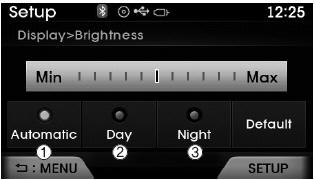
Use  ,
,
 keys to adjust the screen brightness
or set the Brightness on Automatic, Daylight, or Nightmode.
select the  button to reset.
(1) Automatic : Adjusts the brightness automatically
(2) Day : Always maintains the brightness on high
(3) Night : Always maintains the brightness on low
Mode Pop-up
Press the ![Select [Display]](images/books/6/1/page.h498.gif) key
key
![Select [Mode Pop up]](images/books/6/1/page.h499.gif) Select [Display]
Select [Display]
 Select [Mode Pop up]
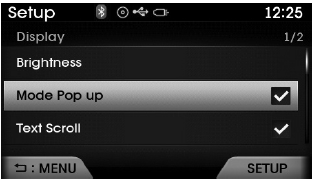
This feature is used to display the Mode Pop-up screen when entering radio and media modes.
When this feature is turned on, pressing the
 or
or
 key will display the Mode Pop-up screen.
✽ NOTICE
The media Mode Pop-up screen can be displayed only when two or more media modes have been connected.
Text Scroll
Press the ![Select [Display]](images/books/6/1/page.h504.gif) key
key
![Select [Text Scroll]](images/books/6/1/page.h505.gif) Select [Display]
Select [Display]
 Select [Text Scroll]
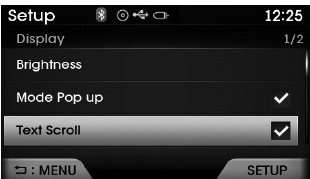
This feature is used to scroll text displayed on the screen when it is too long to be displayed at once.
When turned on, the text is repeatedly scrolled. When turned off, the text is scrolled just once.
MP3 Information Display
Press the ![Select [Display]](images/books/6/1/page.h508.gif) key
key
![Select [Media Display]](images/books/6/1/page.h509.gif) Select [Display]
Select [Display]
 Select [Media Display]
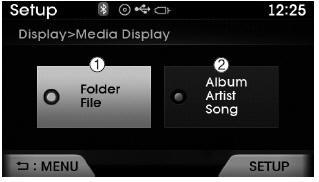
This feature is used to change the information displayed within USB and MP3 CD modes.
(1) Folder File : Displays file name and folder name
(2) Album Artist Song : Displays album name/artist name/song
 Starting Mode
Press the key to display the Setup
screen.
You can select and control options related to [Display], [Sound], [Clock / Calendar],
[Phone] and [System].
✽ NOTICE
Once settings have been c ...
 Sound Settings
Sound Settings
Press the key
Select [Sound]
Select [Sound Setting]
Use ,
keys to adjust the Bass/Middle/Treble
and Fader/ Balance settings.
After selecting the Bass / Mid ...
See also:
Sunvisor Components and Components Location
Component Location
1. Sunvisor2. Retainer
...
Automatic transaxle fluid
Automatic transaxle fluid does not need to be checked under normal usage conditions.
But in severe conditions, the fluid should be changed at an authorized HYUNDAI
dealer in accordance to the schedu ...
Front Bumper Cover Components and Components Location
Component Location
1. Front bumper cover
...
Categories
Hyundai Azera Manuals
