
 Hyundai Azera: Sound Settings
Sound Settings
Press the ![Select [Sound]](images/books/6/1/page.h511.gif) key
key
![Select [Sound Setting]](images/books/6/1/page.h512.gif) Select [Sound]
Select [Sound]
 Select [Sound Setting]
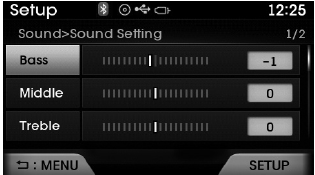
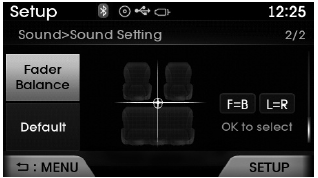
Use  ,
,
 keys to adjust the Bass/Middle/Treble
and Fader/ Balance settings.
After selecting the Bass / Middle / Treble, use
 ,
,
 keys to adjust the setting.
After selecting the Fader / Balance, use
 ,
,
 keys and
 ,
,
 keys to move the cursor on the
control screen to the desired position.
Select the  button to reset.
SDVC (Speed Dependent Volume Control)
Press the![Select [Sound]](images/books/6/1/page.h525.gif) key
key
![Select [Speed Dependent Vol.]](images/books/6/1/page.h526.gif) Select [Sound]
Select [Sound]
 Select [Speed Dependent Vol.]
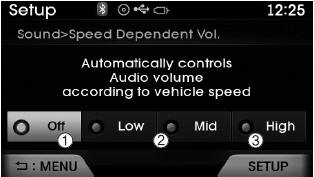
The volume level is controlled automatically according to the vehicle speed.
Use  ,
,
 keys to select from Off/Low/Mid/High.
Voice Recognition Setting
Press the ![Select [Sound]](images/books/6/1/page.h530.gif) key
key
![Select[Voice Recognition Vol.]](images/books/6/1/page.h531.gif) Select [Sound]
Select [Sound]
 Select[Voice Recognition Vol.]
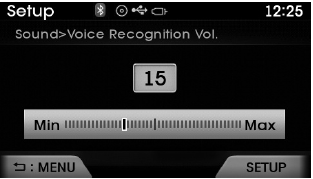
Use  ,
,
 keys to adjust the Voice Recognition
volume.
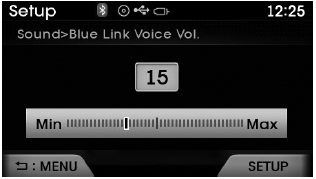
Blue Link Volume
Press the ![Select [Sound]](images/books/6/1/page.h536.gif) key
key
![Select [Blue Link Voice Vol.]](images/books/6/1/page.h537.gif) Select [Sound]
Select [Sound]
 Select [Blue Link Voice Vol.]
Use  ,
,
 keys to adjust the Blue Link Voice
Recognition volume.
✽ NOTICE
This feature may not be available depending on whether your device supports Blue Link.
 Display Settings
Adjusting the Brightness
Press the key
Select [Display]
Select [Brightness]
Use ,
keys to adjust the screen brightness
or set the Brightness on Automatic, Daylight, or Nightmode.
select t ...
 Clock/Calendar Setting
Clock Setting
Press the key
Select [Clock/ Calendar]
Select [Clock Settings]
Use ,
keys to select the Hour, Minutes and
AM/PM setting and use ,
keys to change settings.
Calendar ...
See also:
Heated Steering wheel Repair procedures
Inpection
1.
Measure a resistance of NTC and Heated pad.
A.
NTC resistance(Black / Yellow, Black) - 10.0 k? ± 10% (25°C)
B.
Heated pad resistance (Yellow, Black) - 1.6 ~ 2.0 ? ± 10%
...
Checking the engine oil level
1. Be sure the vehicle is on level ground.
2. Start the engine and allow it to reach normal operating temperature.
3. Turn the engine off and wait for a few minutes (about 5 minutes) for the oil
to ...
Operating door locks from outside the vehicle
With the smart key
Doors can be locked and unlocked pressing the switch of the outside door
handle with the smart key in your possession.
Doors can be locked and unlocked by pressing the butto ...
Categories
Hyundai Azera Manuals
