
 Hyundai Azera: Clock/Calendar Setting
Fifth generation HG (2011–2026) / Hyundai Azera 2011-2026 Owners Manual / Features of your vehicle / Using setup / Clock/Calendar Setting
Hyundai Azera: Clock/Calendar Setting
Fifth generation HG (2011–2026) / Hyundai Azera 2011-2026 Owners Manual / Features of your vehicle / Using setup / Clock/Calendar Setting
Clock Setting
Press the ![Select [Clock/ Calendar]](images/books/6/1/page.h542.gif) key
key
![Select [Clock Settings]](images/books/6/1/page.h543.gif) Select [Clock/ Calendar]
Select [Clock/ Calendar]
 Select [Clock Settings]
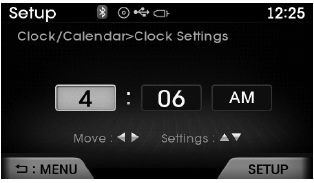
Use  ,
,
 keys to select the Hour, Minutes and
AM/PM setting and use  ,
,
keys to change settings.
Calendar Setting
Press the ![Select [Clock/ Calendar]](images/books/6/1/page.h550.gif) key
key
![Select [Calendar Settings]](images/books/6/1/page.h551.gif) Select [Clock/ Calendar]
Select [Clock/ Calendar]
 Select [Calendar Settings]
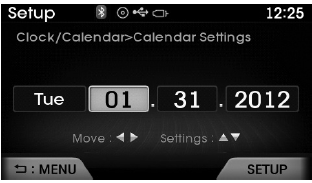
Use  ,
,
 keys to select the Month, Day, and
Year and use  ,
,
 keys to change settings.
Time Format
Press the ![Select [Clock/ Calendar]](images/books/6/1/page.h558.gif) key
key
![Select [Time Format]](images/books/6/1/page.h559.gif) Select [Clock/ Calendar]
Select [Clock/ Calendar]
 Select [Time Format]
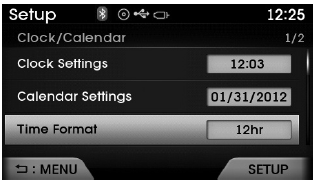
This feature is used to change the clock format between 12hr or 24hr.
Clock Display
Press the ![Select [Clock/ Calendar]](images/books/6/1/page.h562.gif) key
key
![Select [Clock Display (Power off)]](images/books/6/1/page.h563.gif) Select [Clock/ Calendar]
Select [Clock/ Calendar]
 Select [Clock Display (Power off)]
This feature is used to display a clock on the screen when the audio system is turned off.
 Sound Settings
Sound Settings
Press the key
Select [Sound]
Select [Sound Setting]
Use ,
keys to adjust the Bass/Middle/Treble
and Fader/ Balance settings.
After selecting the Bass / Mid ...
 Bluetooth® Wireless Technology Setting
Pairing a New Device
Press the key
Select [Phone]
Select [Pair Phone]
Bluetooth® Wireless Technology devices can be paired with the audio system.
For more information, refer to the “Pairi ...
See also:
Components and Components Location
Component Location (1)
1. Head lamp (Low)2. Head lamp (High)3. Position lamp (LED)4. Front turn signal lamp5. Side marker6. Overhead console lamp (General/Panoramaroof)7. Room lamp (General) ...
CVVT Oil Temperature Sensor (OTS) Schematic Diagrams
Circuit Diagram
...
Main Muffler Components and Components Location
Components
1. Main muffler
...
Categories
Hyundai Azera Manuals
