
 Hyundai Azera: Exhaust Manifold Repair procedures
Fifth generation HG (2011–2026) / Hyundai Azera 2011-2026 Service Manual / Engine Mechanical System / Intake And Exhaust System / Exhaust Manifold Repair procedures
Hyundai Azera: Exhaust Manifold Repair procedures
Fifth generation HG (2011–2026) / Hyundai Azera 2011-2026 Service Manual / Engine Mechanical System / Intake And Exhaust System / Exhaust Manifold Repair procedures
Fifth generation HG (2011–2026) / Hyundai Azera 2011-2026 Service Manual / Engine Mechanical System / Intake And Exhaust System / Exhaust Manifold Repair procedures
| Removal and Installation |
| [LH] |
| 1. |
Disconnect the LH front and rear heated oxygen sensor (HO2S) connector.
|
| 2. |
Remove the front muffler.
(Refer to Intake And Exhaust System - "Front Muffler") |
| 3. |
Remove the cooling fan assembly.
(Refer to Cooling System - "Cooling Fan") |
| 4. |
Remove oil level gauge assembly.
(Refer to Lubrication System - "Oil Level Gauge & Pipe") |
| 5. |
Remove the LH exhaust manifold heat protector (A).
|
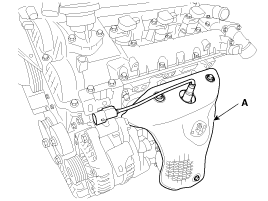
| 6. |
Remove the LH exhaust manifolds stay (A),and then remove the LH exhaust manifold (B) and gasket.
|
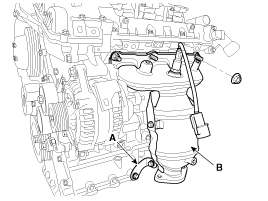
| 7. |
Install in the reverse order of removal.
|

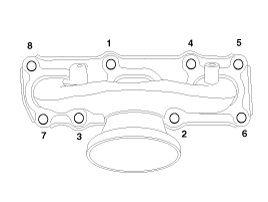
| [RH] |
| 1. |
Disconnect the RH front and rear heated oxygen sensor (HO2S) connector.
|
| 2. |
Remove the surge tank.
(Refer to Intake And Exhaust System - "Surge Tank") |
| 3. |
Remove the front muffler.
(Refer to Intake And Exhaust System - "Front Muffler") |
| 4. |
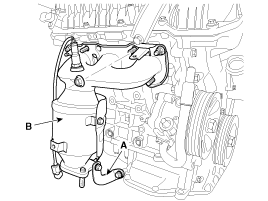
Remove the RH exhaust manifold heat protector (A).
|
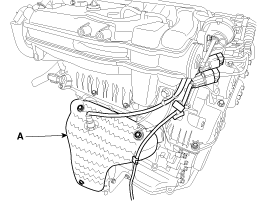
| 5. |
Remove the RH exhaust manifolds stay (A),and then remove the RH exhaust manifold (B) and gasket.
|
| 6. |
Install in the reverse order of removal.
|
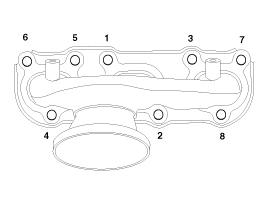
 Exhaust Manifold Components and Components Location
Components
1. LH Exhaust manifold gasket2. LH Exhaust manifold3. LH Heat protector4. LH Exhaust manifold stay5. RH Exhaust manifold gasket6. RH Exhaust manifold7. RH Heat protector8. RH Exhaust m ...
 Front Muffler Components and Components Location
Components
1. Front muffler
...
See also:
Air cleaner filter
A Genuine HYUNDAI air cleaner filter is recommended when the filter is replaced. ...
Automatic Transaxle Repair procedures
Removal
1.
Engine cover.
(Refer to Engine Mechanical System - "Engine cover")
2.
Air cleaner assembly and air duct.
(Refer to Engine Mechanical System - "Air cleaner")
3.
Battery and ba ...
Categories
Hyundai Azera Manuals

© 2011-2026 Copyright www.hgmanual.com