
 Hyundai Azera: High beam operation
Fifth generation HG (2011–2026) / Hyundai Azera 2011-2026 Owners Manual / Features of your vehicle / Lighting / High beam operation
Hyundai Azera: High beam operation
Fifth generation HG (2011–2026) / Hyundai Azera 2011-2026 Owners Manual / Features of your vehicle / Lighting / High beam operation
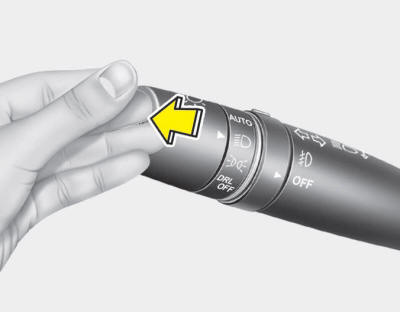
To turn on the high beam headlights, push the lever away from you. Pull it back for low beams.
The high beam indicator will light when the headlight high beams are switched on.
To prevent the battery from being discharged, do not leave the lights on for a prolonged time while the engine is not running.
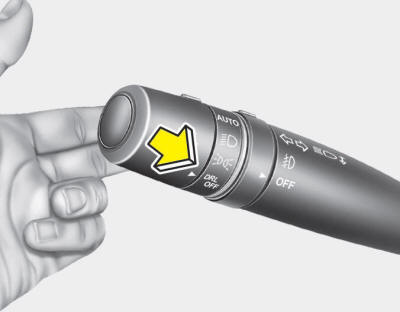
To flash the headlights, pull the lever towards you. It will return to the normal (low beam) position when released. The headlight switch does not need to be on to use the flashing feature.
WARNING
Do not use high beam when there are surrounding vehicles. Using high beam could obstruct the other driver's vision.
 Lighting control
The light switch has a Headlight and a Parking light position.
To operate the lights, turn the knob at the end of the control lever to one of
the following positions:
(1) OFF position
(2) Park ...
 Turn signals and lane change signals
The ignition switch must be on for the turn signals to function. To turn on the
turn signals, move the lever up or down (A). Green arrow indicators on the instrument
panel indicate which turn si ...
See also:
Schematic Diagrams
Circuit Diagram
Input/Output Specification
Connector Pin Lay Out
IMS input/output pin information
NoSignal NameI/OContentsRemarkA1Cushion motor FROCushion motor FR outputA2FR height motor upOF ...
Before starting
Close and lock all doors.
Position the seat so that all controls are easily reached.
Adjust the inside and outside rearview mirrors.
Be sure that all lights work.
Check all gauges.
Check ...
Front Bumper Cover Components and Components Location
Component Location
1. Front bumper cover
...
Categories
Hyundai Azera Manuals
