
 Hyundai Azera: MP3 CD Mode Menu
Fifth generation HG (2011–2026) / Hyundai Azera 2011-2026 Owners Manual / Features of your vehicle / Using MP3 CD Mode / MP3 CD Mode Menu
Hyundai Azera: MP3 CD Mode Menu
Fifth generation HG (2011–2026) / Hyundai Azera 2011-2026 Owners Manual / Features of your vehicle / Using MP3 CD Mode / MP3 CD Mode Menu
If you press the  key, you will
have access to the Repeat, Shuffle, List, Info and Copy features.
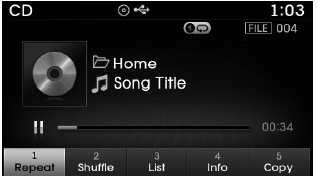
Repeat
Press the  key
key
 Select
 Each time the button is pressed, the
feature changes in order of Repeat ➟Repeat Folder➟Off.
- Repeat Once : Repeats the current file.
- Repeat Folder : Repeats all files within the current Folder.
Shuffle
Press the  key
key
 Select
 Each time the button is pressed, the
feature changes in order of Shuffle Folder ➟ Shuffle All➟ Off.
- Folder Shuffle : Plays all files within the current folder in Random order.
- Shuffle All : Plays all files in Random order.
✽ NOTICE
The  ,
,
 keys are shortcut keys to set the
Repeat and Shuffle features.
List
Press the  key
key
 Select

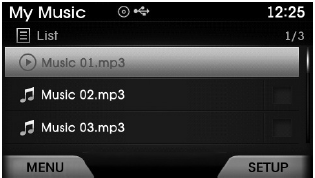
Press the  ,
,
 keys to search for the desired file
and press the  key to select.
Info
Press the  key
key
 Select
 Details for the currently playing
file are displayed.
✽ NOTICE
- When the ‘Folder File’ option is set as the default display within Display setup, the album/artist/file information are displayed as detailed file information.
- When the ‘Album Artist Song’ option is set as the default display, the folder name/file name are displayed as detailed file information.
- The title, artist and album info are displayed only when such information are recorded within the MP3 file ID3 tag.
Copy Files
Press the  key
key
 Select
 The currently playing file is copied
into My Music.
✽ NOTICE
- Selecting another feature during copying will display a pop-up asking whether you wish to cancel copying. To cancel, select 'Yes’.
 Playing/Pausing MP3 Files
Once an MP3 disc is inserted the mode will automatically start and being playing.
While playing, press the key to
pause and press again to play.
✽ NOTICE
If there are numerous files and f ...
 USB Mode
...
See also:
Owner maintenance precautions
Improper or incomplete service may result in problems. This section gives instructions
only for the maintenance items that are easy to perform.
As explained earlier in this section, several procedur ...
Tire traction
Tire traction can be reduced if you drive on worn tires, tires that are improperly
inflated or on slippery road surfaces. Tires should be replaced when tread wear
indicators appear. To reduce the po ...
Description and Operation
Description
Remote Keyless Entry System
The described function is a radio-frequency remote control
for central doors locking / unlocking, trunk release and Panic activity
of an automotive vehi ...
Categories
Hyundai Azera Manuals
