
 Hyundai Azera: MTS Antenna Repair procedures
Fifth generation HG (2011–2026) / Hyundai Azera 2011-2026 Service Manual / Body Electrical System / MTS System / MTS Antenna Repair procedures
Hyundai Azera: MTS Antenna Repair procedures
Fifth generation HG (2011–2026) / Hyundai Azera 2011-2026 Service Manual / Body Electrical System / MTS System / MTS Antenna Repair procedures
Fifth generation HG (2011–2026) / Hyundai Azera 2011-2026 Service Manual / Body Electrical System / MTS System / MTS Antenna Repair procedures
| Removal |
Roof Antenna (GPS)
| 1. |
Remove the rear roof trim.
|
| 2. |
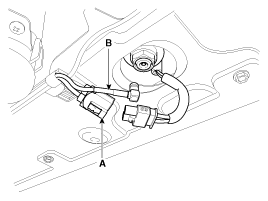
Disconnect the Connector(A) and cables (B) from the roof antenna.
|
| 3. |
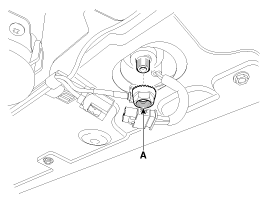
Remove the roof antenna after removing a nut(A).
|
| Installation |
Roof Antenna (GPS)
| 1. |
Install the roof antenna. |
| 2. |
Connect the GPS cable. |
| 3. |
Install the nut. |
| 4. |
Install the rear roof trim.
|

 MTS Antenna Components and Components Location
Components
...
 Smart key System
...
See also:
Troubleshooting
Troubleshooting
1.
The lamp switch inputs can be checked using the GDS.
2.
To check the input value of lamp switch, select option "IPM".
3.
To consult the present input/output value of IPM ...
Tire and loading information label
The label located on the driver's door sill gives the original tire size, cold
tire pressures recommended for your vehicle, the number of people that can be in
your vehicle and vehicle capacity ...
Positive Crankcase Ventilation (PCV) Valve Repair procedures
Removal
1.
Disconnect the vapor hose (A).
2.
Remove the PCV valve (B).
Inspection
1.
Insert a thin stick (A) into the PCV valve (B) from the threaded side to check that the plunger moves ...
Categories
Hyundai Azera Manuals

© 2011-2026 Copyright www.hgmanual.com