
 Hyundai Azera: My Music Mode Menu
Fifth generation HG (2011–2026) / Hyundai Azera 2011-2026 Owners Manual / Features of your vehicle / My music mode / My Music Mode Menu
Hyundai Azera: My Music Mode Menu
Fifth generation HG (2011–2026) / Hyundai Azera 2011-2026 Owners Manual / Features of your vehicle / My music mode / My Music Mode Menu
If you press the  key, you will
have access to the Repeat, Shuffle, List, Info and Delete features.
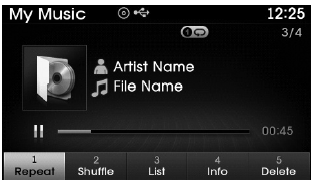
Repeat
Press the  key
key
 Select
 Repeat : Repeats the current file.
Shuffle
Press the  key
key
 Select
 Shuffle : Plays all files in random
order.
✽ NOTICE
The  ,
,
 keys are shortcut keys to set the
Repeat and Shuffle features.
List
Press the  key
key
 Select

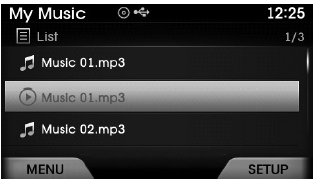
Press the  ,
,
 keys to search for the desired file
and press the  key to select.
Info
Press the  key
key
 Select
 Details for the currently playing
file are displayed.
✽ NOTICE
The title, artist and album info are displayed only when such information is recorded within the MP3 file ID3 tag.
Deleting Files
Press the  key
key
 Select
 The currently playing file is deleted.
 Using My Music Mode
Playing/Pausing My Music Files
While playing, press the key to
pause and press again to play.
✽ NOTICE
If there are no files saved within My Music, the
button will be disabled.
Changi ...
 List Menu
From the List screen Press the
Select [Edit].
Files saved in My Music can be selected and deleted.
Use ,
keys and the
key to search and select files you
want to delete and select the ...
See also:
Input Speed Sensor Specifications
Specifications
? Type: Hall effect sensor
Operation condition [°C(°F)](-40~150) -40~302Air gap(mm)in.(0.95~1.65)0.037~0.065Output voltage(V)High1.18~1.68Low0.59~0.84
...
Yaw-rate and G Sensor Description and Operation
Description
When the vehicle is turning with respect to a vertical axis
the yaw rate sensor detects the yaw rate electroniclly by the vibration
change of plate fork inside the yaw rate sensor.
...
This device complies with Part 15 of the FCC rules.
Operation is subject to the following two conditions:
1.This device may not cause harmful interference, and
2.This device must accept any interference received, including interference that
may caus ...
Categories
Hyundai Azera Manuals
