
 Hyundai Azera: Using iPod® Mode
Fifth generation HG (2011–2026) / Hyundai Azera 2011-2026 Owners Manual / Features of your vehicle / iPod® Mode / Using iPod® Mode
Hyundai Azera: Using iPod® Mode
Fifth generation HG (2011–2026) / Hyundai Azera 2011-2026 Owners Manual / Features of your vehicle / iPod® Mode / Using iPod® Mode
Playing/Pausing iPod® Songs
Once an iPod® is connected, the mode will automatically start and begin playing an iPod® song.
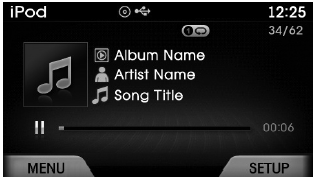
While playing, press the  key to
pause and press again to play.
✽ NOTICE
iPod® with unsupported communication protocols may not properly operate in the audio system.
Changing Songs
Press the  keys to select the previous
or next file.
✽ NOTICE
- Pressing the key after the song has been playing for 2 seconds will start the current song from the beginning.
- Pressing the key before the song has been playing for 1 seconds will start the previous song.
- Slight time differences may exist depending your iPod® product.
Rewinding / Fast-forwarding Songs
While playing, press and hold the
 keys (over 0.8 seconds) to rewind
or fast-forward the current song.
Searching Categories
Press the  ,
,
 keys to search categories and press
the  key to select.
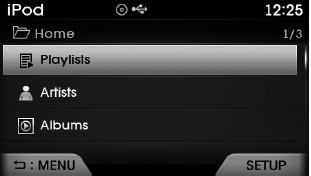
If you press the  key within the
Category Menu, This button is used to move to the previous category.
✽ NOTICE
- There are eight categories that can be searched, including Playlists, Artists, Albums, Genres, Songs, Composers, Audiobooks and Podcasts.
- If the search mode is accessed while playing a song, the most recently searched category is displayed.
- Search steps upon initial connection may differ depen
 Basic Mode Screen
(1) Mode Displays currently operating mode.
(2) Operation State From Repeat / Shuffle, displays the currently operating function.
(3) Song Index Displays the current song/total number of songs.
( ...
 iPod® Mode Menu
If you press the key, you will
have access to the Repeat, Shuffle and List features.
Repeat
Press the key
Select
Repeat Once : Repeats the current song.
Shuffle
Press the key
Sel ...
See also:
Fuel Pump Repair procedures
Inspection
[Fuel pump]
1.
Turn the ignition switch OFF, and then remove battery (-) cable.
2.
Remove the fuel pump assembly.
3.
Check motor operation by fuel pump connector (A) connecti ...
Front Muffler Repair procedures
Removal and Installation
1.
Disconnect the battery negative terminal.
2.
Remove the engine room under cover.
3.
Disconnect the heated oxygen sensor (HO2S) connector.
(Refer to Fuel Sys ...
Injector Description and Operation
Description
Based on information from various sensors, the ECM can
calculate the fuel amount to be injected. The fuel injector is a
solenoid-operated valve and the fuel injection amount is cont ...
Categories
Hyundai Azera Manuals
