
 Hyundai Azera: Basic Mode Screen
Fifth generation HG (2011–2026) / Hyundai Azera 2011-2026 Owners Manual / Features of your vehicle / MP3 CD Mode / Basic Mode Screen
Hyundai Azera: Basic Mode Screen
Fifth generation HG (2011–2026) / Hyundai Azera 2011-2026 Owners Manual / Features of your vehicle / MP3 CD Mode / Basic Mode Screen
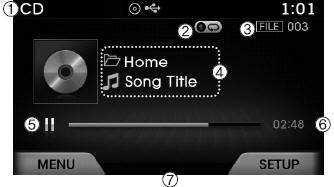
(1) Mode Displays currently operating mode.
(2) Operation State From Repeat / Shuffle / Scan, displays the currently operating function.
(3) File Index Displays the current file number.
(4) File Info Displays information about the current file.
(5) Play State Displays the play/pause state.
(6) Play Time Displays the current play time.
(7) MENU Displays the CD MP3 Menu.
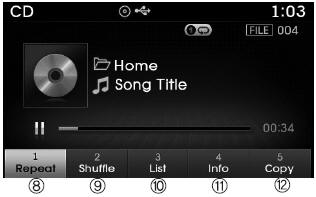
(8) Repeat Turns the Repeat feature on/off.
(9) Shuffle Turns the Shuffle feature on/off.
(10) List Moves to the list screen.
(11) Info Shows detailed information about the current file.
(12) Copy Copies the current file into My Music
 MP3 CD Mode
...

See also:
Rear Bumper Cover Components and Components Location
Component Location
1. Rear Bumper Cover
...
Alignment Repair procedures
Front Wheel Alignment
When using a commercially available computerized wheel
alignment equipment to inspect the front wheel alignment, always
position the vehicle on a lev ...
Smart Cruise Control Unit Repair procedures
Removal
1.
Remove the bumper.
(Refer to Body - "Front Bumper Cover")
2.
Loosen the bolts and nuts and then remove the smart cruise control unit assembly (A) from the vehicle.
3.
Disconn ...
Categories
Hyundai Azera Manuals
