
 Hyundai Azera: Drive Belt Tensioner Repair procedures
Fifth generation HG (2011–2026) / Hyundai Azera 2011-2026 Service Manual / Engine Mechanical System / Timing System / Drive Belt Tensioner Repair procedures
Hyundai Azera: Drive Belt Tensioner Repair procedures
Fifth generation HG (2011–2026) / Hyundai Azera 2011-2026 Service Manual / Engine Mechanical System / Timing System / Drive Belt Tensioner Repair procedures
Fifth generation HG (2011–2026) / Hyundai Azera 2011-2026 Service Manual / Engine Mechanical System / Timing System / Drive Belt Tensioner Repair procedures
| Removal and Installation |
| 1. |
Remove the drive belt idler.
(Refer to Timing System - "Idler") |
| 2. |
Remove the drive belt auto tensioner (A).
|
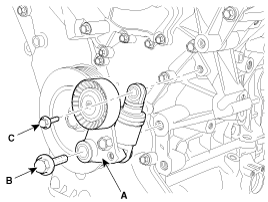
| 3. |
Installation is reverse order of removal |
 Drive Belt Tensioner Components and Components Location
Components
1. Drive belt tensioner
...
 Crankshaft Damper Pulley Components and Components Location
Components
1. Crankshaft damper pulley
...
See also:
Side Body Body Repair
Side Body A
Front side member tooling hole (O20)Fender apron upper member tooling hole (O10) Front door upper hinge mounting hole(O13) Front door lower hinge mounting hole (O13) Rear door upper h ...
Radiator Components and Components Location
Components
1. Radiator2. Radiator mounting bracket3. Radiator cap4. Drain plug5. Mounting insulator
...
LCD display
The Trip computer, User settings, Maintenance system, Warnings, etc. are displayed
on the LCD display. To change between groups, press the DISP button.
To change between modes in groups, press t ...
Categories
Hyundai Azera Manuals

© 2011-2026 Copyright www.hgmanual.com