
 Hyundai Azera: Roof Trim Assembly Repair procedures
Fifth generation HG (2011–2026) / Hyundai Azera 2011-2026 Service Manual / Body (Interior and Exterior) / Roof Trim / Roof Trim Assembly Repair procedures
Hyundai Azera: Roof Trim Assembly Repair procedures
Fifth generation HG (2011–2026) / Hyundai Azera 2011-2026 Service Manual / Body (Interior and Exterior) / Roof Trim / Roof Trim Assembly Repair procedures
Fifth generation HG (2011–2026) / Hyundai Azera 2011-2026 Service Manual / Body (Interior and Exterior) / Roof Trim / Roof Trim Assembly Repair procedures
| Replacement |
|

| 1. |
Remove the front seat assembly.
(Refer to Front Seat - "Front Seat Assembly") |
| 2. |
Remove the rear seat assembly.
(Refer to Rear Seat - "Rear Seat Assembly") |
| 3. |
Remove the console rear complete & console front complete assembly.
(Refer to Floor Console - "Floor Console Assembly") |
| 4. |
Remove the front pillar trim.
(Refer to Interior Trim - "Front Pillar Trim") |
| 5. |
Remove the center pillar upper trim.
(Refer to Interior Trim - "Center Pillar Trim") |
| 6. |
Remove the rear pillar trim.
(Refer to Interior Trim - "Rear Pillar Trim") |
| 7. |
Remove the sunvisor and retainer.
(Refer to Roof Trim - "Sunvisor") |
| 8. |
Remove the assist handle.
(Refer to Roof Trim - "Assist Handle") |
| 9. |
Remove the overhead console lamp.
|
| 10. |
Remove the room lamp.
|
| 11. |
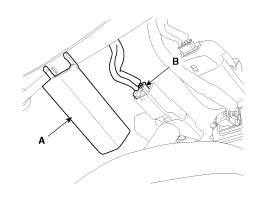
Remove the ECM mirror cover (A). |
| 12. |
Disconnect the ECM mirror connector (B).
|
| 13. |
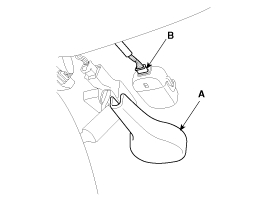
Remove the rain sensor cover (A). |
| 14. |
Disconnect the rain sensor connector (B).
|
| 15. |
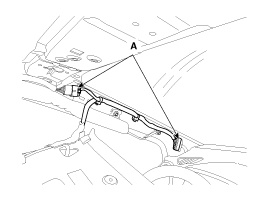
Disconnect the roof trim main connectors (A).
|
| 16. |
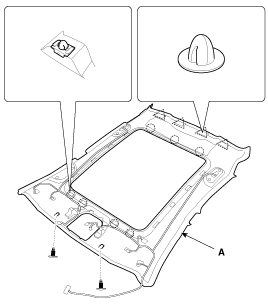
Detach the clips, then remove the roof trim assembly (A).
|
| 17. |
Remove the vanity lamp.
|
| 18. |
Remove the hands free mic.
|
| 19. |
Installation is the reverse of removal.
|

 Roof Trim Assembly Components and Components Location
Component Location
1. Roof Trim Assembly
...
 Interior Trim
...
See also:
Front Seat Shield Outer Cover Repair procedures
Replacement
•
Use a plastic panel removal tool to remove interior trim pieces to protect from marring the surface.
•
Take care not to bend or scratch the trim and ...
Opening the trunk
Press the trunk unlock button for more than 1 second on the smart key.
Press the switch on the trunk handle with the smart key in your possession
(2).
Insert the mechanical key of the smar ...
CVVT Assembly Repair procedures
Removal
1.
Remove the timing chain.
(Refer to Timing System - "Timing Chain")
2.
Remove the CVVT assembly.
A.
A: LH exhaust CVVT
B.
B: LH intake CVVT
C.
C: RH intake CVVT
D.
D: ...
Categories
Hyundai Azera Manuals

© 2011-2026 Copyright www.hgmanual.com