
 Hyundai Azera: Deleting a Device
Press the ![Select [Phone]](images/books/6/1/page.h454.gif) key
key
![Select [Paired Phone List]](images/books/6/1/page.h455.gif) Select [Phone]
Select [Phone]
 Select [Paired Phone List]
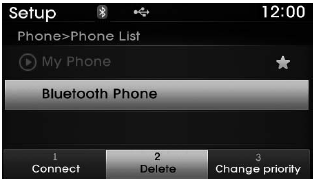
From the paired phone list, select the device you want to delete and select the
 button.
✽ NOTICE
- When deleting the currently connected device, the device will automatically be disconnected to proceed with the deleting process.
- If a paired Bluetooth® Wireless Technology device is deleted, the device’s call history and contacts data will also be deleted.
- To re-use a deleted device, you must pair the device again.
 Disconnecting a Device
Press the key
Select [Phone]
Select [Paired Phone List]
From the paired phone list, select the currently connected device and select
the button.
...

See also:
Parking Assist Sensor Schematic Diagrams
Circuit diagram
...
ICM (Integrated Circuit Module) Relay Box Specifications
Specification
Rated voltageDC 12VOperating voltageDC 9 ~ 16VUse of temperature range-30°C ~ 75°CPreserve temperature range-40°C ~ 85°CInsulation resistance100M? MIN. / 500VM
...
Smart key functions
1. Door lock
2. Door unlock
3. Trunk open
4. Alarm
With a smart key, you can lock or unlock a door (and trunk) and even start the
engine without inserting the key. Refer to the following, for mor ...
Categories
Hyundai Azera Manuals

© 2011-2026 Copyright www.hgmanual.com