
 Hyundai Azera: USB Mode Menu
If you press the  key, you will
have access to the Repeat, Shuffle, List, Info and Copy features.
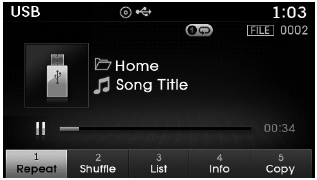
Repeat
Press the  key
key
 Select
 Each time the button is pressed, the
feature changes in order of Repeat➟ Repeat Folder➟ Off.
- Repeat : Repeats the current file.
- Folder Repeat : Repeats all files within the current folder.
Shuffle
Press the  key
key
 Select
 Each time the button is pressed, the
feature changes in order of Shuffle Folder➟Shuffle All➟Off.
- Folder Shuffle : Plays the files in the current folder in random order.
- Shuffle All : Plays all files in random order.
✽ NOTICE
The  ,
,
 keys are shortcut keys to set the
Repeat and Shuffle features.
List
Press the  key
key
 Select

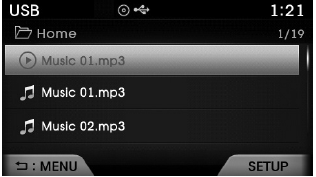
Press the  ,
,
 keys to search for the desired file
and press the  key to select.
Info
Press the  key
key
 Select
 Details for the currently playing
file are displayed.
✽ NOTICE
- When the ‘Folder File’ option is set as the default display within Display setup, the album/artist/file information are displayed as detailed file information.
- When the ‘Album Artist Song’ option is set as the default display, the folder name/file name are displayed as detailed file information.
- The title, artist and album info are displayed only when such information are recorded within the MP3 file ID3 tag.
Copy Files
Press the  key
key
 Select
 The currently playing file is copied
into My Music.
✽ NOTICE
Selecting another feature during copying will display a pop-up asking whether you wish to cancel copying. To cancel, select 'Yes’.
 Using USB Mode
Playing/Pausing USB Files
Once a USB is connected, the mode will automatically start and begin playing
a USB file.
While playing, press the key to
pause and press again to play.
✽ NOTIC ...
 iPod® Mode
...
See also:
Front Hub - Axle Repair procedures
Replacement
1.
Loosen the wheel lug nuts slightly.
Raise the vehicle, and make sure it is securely supported.
2.
Remove the front wheel and tire(A) from front hub.
Tightening torque:
88.2 ...
Front Door Trim Repair procedures
Replacement
•
Be careful not to scratch the door trim and other parts.
•
Put on gloves to protect your hands.
1.
Using a screwdriver or remover, remove the ...
Cowl Side Trim Repair procedures
Replacement
•
Use a plastic panel removal tool to remove interior trim pieces to protect from marring the surface.
•
Take care not to bend or scratch the trim and ...
Categories
Hyundai Azera Manuals
