
 Hyundai Azera: Using Bluetooth® Wireless Technology Audio Mode
Fifth generation HG (2011–2026) / Hyundai Azera 2011-2026 Owners Manual / Features of your vehicle / Bluetooth® Wireless Technology Audio mode / Using Bluetooth® Wireless Technology Audio Mode
Hyundai Azera: Using Bluetooth® Wireless Technology Audio Mode
Fifth generation HG (2011–2026) / Hyundai Azera 2011-2026 Owners Manual / Features of your vehicle / Bluetooth® Wireless Technology Audio mode / Using Bluetooth® Wireless Technology Audio Mode
Playing/Pausing Bluetooth® Wireless Technology Audio
Once a Bluetooth® Wireless Technology device is connected, the mode will automatically start.
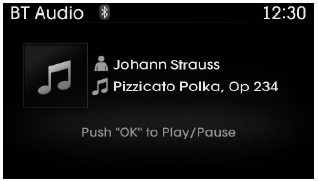
While playing, press the  key to
pause and press  key to play.
✽ NOTICE
The play/pause feature may operate differently depending on the mobile phone.
Changing Files
Press the  key to move to the previous
or next file.
Setting Connection
If a Bluetooth® Wireless Technology device has not been connected, press the
![[Phone] button to display the Bluetooth®](images/books/6/1/page.h424.gif) key
key
 [Phone] button to display the Bluetooth®
Wireless Technology connection screen.
It is possible to use the pair phone, connect/disconnect and delete features from your Bluetooth® Wireless Technology phone.
✽ NOTICE
- If the Bluetooth® Wireless Technology audio is not operating properly,
check whether the feature is turned off at
![[Phone]](images/books/6/1/page.h426.gif)
![[Streaming Audio]. If the feature](images/books/6/1/page.h427.gif) [Phone]
[Phone]
 [Streaming Audio]. If the feature
is off, turn back on and try again. - If music is not yet playing from your mobile device after converting to Bluetooth® Wireless Technology Audio mode, pressing the play button once may start playing the mode. Check to see that music is playing from the Bluetooth® Wireless Technology device after converting to Bluetooth® Wireless Technology Audio Mode.

 Pairing a Bluetooth® Wireless Technology Device
What is Bluetooth® Wireless Technology Pairing?
Pairing refers to the process of synchronizing your Bluetooth® Wireless Technology
phone or device with the car audio system for connection. Pairing ...
See also:
Front Seat Belt Buckle Components and Components Location
Component Location
1. Front seat belt buckle
...
Rearview camera (If equipped)
The rearview camera will activate when the back-up light is ON with the ignition
switch ON and the shift lever in the R (Reverse) position.
This system is a supplemental system that shows behind t ...
Categories
Hyundai Azera Manuals
