
 Hyundai Azera: Rearview camera (If equipped)
Fifth generation HG (2011–2026) / Hyundai Azera 2011-2026 Owners Manual / Features of your vehicle / Rearview camera (If equipped)
Hyundai Azera: Rearview camera (If equipped)
Fifth generation HG (2011–2026) / Hyundai Azera 2011-2026 Owners Manual / Features of your vehicle / Rearview camera (If equipped)
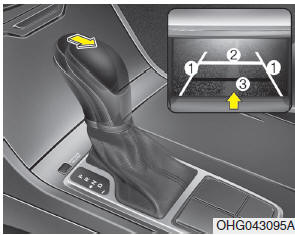
The rearview camera will activate when the back-up light is ON with the ignition switch ON and the shift lever in the R (Reverse) position.
This system is a supplemental system that shows behind the vehicle through the display monitor while backing-up.
Always keep the camera lens clean. If the lens is covered with foreign matter, the camera may not operate normally.
WARNING - Rearview camera
The rear view camera is not a safety device. It only serves to assist the driver in identifying objects directly behind the middle of the vehicle. The camera does NOT cover the complete area behind the vehicle. While the camera's display is generally accurate, objects can be much closer than they appear in the display screen and can be distorted in both size and proportion.
WARNING - Backing & using camera
Never rely solely on the rear view camera when reversing. You must always view the area behind you including looking over both shoulders as well as continuously checking all three rear view mirrors. Due to the difficulty of ensuring that the area behind you remains clear, always back slowly and stop immediately if you even suspect that a person, and especially a child, might be behind you. Otherwise serious injury or death could occur.
 Self-diagnosis
When you shift the gear to the R (Reverse) position and if one or more of the
below occurs you may have a malfunction in the rear parking assist system.
You do not hear an audible warning sound o ...
 Hazard warning flasher
The hazard warning flasher should be used whenever you find it necessary to stop
the car in a hazardous location. When you must make such an emergency stop, always
pull off the road as far as poss ...
See also:
Operation in foreign countries
If you are going to drive your vehicle in another country, be sure to:
Observe all regulations regarding registration and insurance.
Determine that acceptable fuel is available.
...
Smart key unit Repair procedures
Removal
-
Take care not to scratch the crash pad and related parts
Smart key unit
1.
Disconnect the negative (-) battery terminal.
2.
Remove the accelerator pedal ...
Side Airbag (SAB) Module Components and Components Location
Components
...
Categories
Hyundai Azera Manuals
