
 Hyundai Azera: Using My Music Mode
Fifth generation HG (2011–2026) / Hyundai Azera 2011-2026 Owners Manual / Features of your vehicle / My music mode / Using My Music Mode
Hyundai Azera: Using My Music Mode
Fifth generation HG (2011–2026) / Hyundai Azera 2011-2026 Owners Manual / Features of your vehicle / My music mode / Using My Music Mode
Playing/Pausing My Music Files
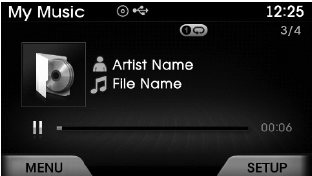
While playing, press the  key to
pause and press again to play.
✽ NOTICE
If there are no files saved within My Music, the
 button will be disabled.
Changing Files
Press the  keys to select the previous
or next file.
✽ NOTICE
- Pressing the key after the file has been playing for 2 seconds will start the current file from the beginning.
- Pressing thex key before the file has been playing for 1 seconds will start the previous file.
Selecting from the List Press the
 ,
,
 keys to search and select desired
files.
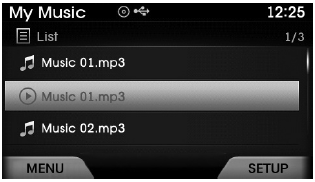
Once you find the desired file, press the
 key to start playing.
Rewinding / Fast-forwarding Files
While playing, press and hold the
 keys (over 0.8 seconds) to rewind
or fast-forward the current file.
Scan
Press the  key to play the first
10 seconds of each file.
 Basic Mode Screen
(1) Mode Displays currently operating mode.
(2) Operation State From Repeat / Shuffle / Scan, displays the currently operating
function.
(3) File Index Displays the current file/total number of ...
 My Music Mode Menu
If you press the key, you will
have access to the Repeat, Shuffle, List, Info and Delete features.
Repeat
Press the key
Select
Repeat : Repeats the current file.
Shuffle
Press the key
...
See also:
Brake Line Repair procedures
Removal
1.
Disconnect the brake fiuid level switch connector, and remove the reservoir cap.
2.
Remove the brake fluid from the master cylinder reservior with a syringe.
...
Repair procedures
Starter Circuit Troubleshooting
The battery must be in good condition and fully charged.
1.
Disconnect the injector connectors.
2.
With the shift lever in N or P (A/T) ...
Transaxle Control Module (TCM) Schematic Diagrams
TCM connector and terminal function
TCM Terminal Function
Connector [ELG-A]
PinDescriptionPinDescription1?51?2?52?3?53?4?54Sports mode down switch5?55?6?56?7?57?8?58?9CCP CAN(HIGH)59?10CAN Commu ...
Categories
Hyundai Azera Manuals
