| 1. |
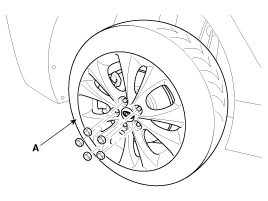
Remove the rear wheel & tire (A).
Tightening torque:
88.3 ~ 107.9N.m (9.0 ~ 11.0kgf.m, 65.1 ~ 79.6lb-ft)
|
| • |
Be careful not to damage to the hub bolts when removing the front wheel & tire. |
|
|
| 2. |
Set up the transmission jack (A) under the lower arm (B). 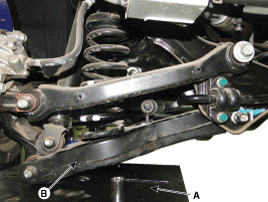
|
| 3. |
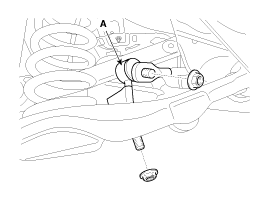
Loosen the nut and then remove the rear stabilizer link (A) from the lower arm and subframe.
Tightening torque:
98.1 ~ 117.7N.m (10.0 ~ 12.0kgf.m, 72.3 ~ 86.8lb-ft)
|
|
| 4. |
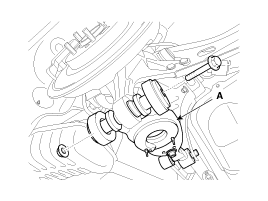
Loosen the bolt & nut and then remove the rear lower arm (A) with the rear axle.
Tightening torque:
137.3~156.9N.m(14.0~16.0Kgf.m, 101.3~115.7lb-ft)
|
| • |
When removing the bolt, remove the upper arm in no-load condition by using the transmission jack. |
|
|
| 5. |
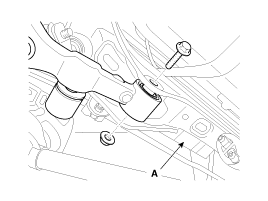
Loosen the bolt & nut and then remove the rear lower arm (A) from the sub frame.
Tightening torque:
107.9~117.7N.m(11.0~12.0Kgf.m, 79.6~86.8lb-ft)
|
| • |
When removing the bolt, remove the lower arm in no-load condition by using the transmission jack. |
|
|
| 1. |
Installation is the reverse of removal.
| • |
If you don't install the jack, the bolt may cut due to the high work load of lower arm mounting bolt. |
| • |
Install the component with the specified torques. |
| • |
When installing the bolt, install the lower arm in no-load condition by using the transmission jack. |
|
|
| 1. |
Check the bushing for wear and deterioration. |
| 2. |
Check the rear lower arm for deformation. |
| 3. |
Check for all bolts and nut. |
| 4. |
Check the cracks or the cutting of the lower arm. |
Removal
1.
Remove the rear wheel & tire (A).
Tightening torque:
88.3 ~ 107.9N.m (9.0 ~ 11.0kgf.m, 65.1 ~ 79.6lb-ft)
Be careful not to damage to the hub bolts when ...
Replacement
1.
Remove the rear wheel & tire (A).
Tightening torque:
88.3 ~ 107.9N.m (9.0 ~ 11.0kgf.m, 65.1 ~ 79.6lb-ft)
•
Be careful not to damage to the hub ...

 Hyundai Azera: Rear Lower Arm Repair procedures
Fifth generation HG (2011–2026) / Hyundai Azera 2011-2026 Service Manual / Suspension System / Rear Suspension System / Rear Lower Arm Repair procedures
Hyundai Azera: Rear Lower Arm Repair procedures
Fifth generation HG (2011–2026) / Hyundai Azera 2011-2026 Service Manual / Suspension System / Rear Suspension System / Rear Lower Arm Repair procedures

 Rear Upper Arm Repair procedures
 Rear Stabilizer Bar Repair procedures