
 Hyundai Azera: Multimedia system
Fifth generation HG (2011–2026) / Hyundai Azera 2011-2026 Owners Manual / Features of your vehicle / Multimedia system
Hyundai Azera: Multimedia system
Fifth generation HG (2011–2026) / Hyundai Azera 2011-2026 Owners Manual / Features of your vehicle / Multimedia system
Fifth generation HG (2011–2026) / Hyundai Azera 2011-2026 Owners Manual / Features of your vehicle / Multimedia system
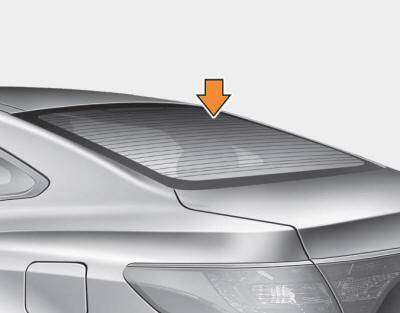
- Glass antenna
- Steering wheel audio control
- Audio system
- Bluetooth® Wireless Technology
- Navigation system
- Aux, USB and iPod® port
- How vehicle audio works
- Caring for disc
 Side curtain (if equipped)
To use the side curtain:
1. Lift the curtain by the hook (1).
2. Hang the curtain on both sides of the hook. ...
 Glass antenna
When the radio power switch is turned on while the ignition switch is in either
the “ON� or “ACC� position, your vehicle will receive both AM and FM broadcast signals
through the antenna in ...
See also:
Components and Components Location
Component Location
1. Power door mirror2. Power door mirror switch3. Power folding mirror switch
...
Radiator Repair procedures
Removal and Installation
1.
Remove the radiator upper hose and lower hose.
(Refer to Cooling System - "Radiator Hose")
2.
Remove the cooling fan assembly.
(Refer to Cooling System - "Cooli ...
Wiper blades
...
Categories
Hyundai Azera Manuals

© 2011-2026 Copyright www.hgmanual.com