
 Hyundai Azera: Aux, USB and iPod® port
Fifth generation HG (2011–2026) / Hyundai Azera 2011-2026 Owners Manual / Features of your vehicle / Multimedia system / Aux, USB and iPod® port
Hyundai Azera: Aux, USB and iPod® port
Fifth generation HG (2011–2026) / Hyundai Azera 2011-2026 Owners Manual / Features of your vehicle / Multimedia system / Aux, USB and iPod® port
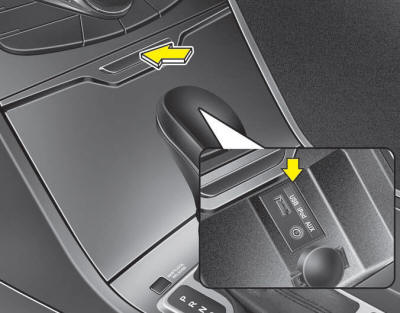
If your vehicle has an aux, USB (universal serial bus) port or iPod® port, you can use an aux port to connect audio devices, a USB port to plug in a USB and an iPod® port to plug in an iPod®.
When using a portable audio device connected to the power outlet, noise may occur during playback. If this happens, use the power source of the portable audio device.
 Navigation system
The navigation system ascertains the present position of your vehicle by using
information from satellites and guides you to the place you assign as the destination.
Detailed information for the nav ...
 How vehicle audio works
AM and FM radio signals are broadcast from transmitter towers located around
your city. They are intercepted by the radio antenna on your vehicle. This signal
is then processed by the radio and se ...
See also:
Fuel Pump Motor Repair procedures
Removal
1.
Remove the fuel pump.
(Refer to Fuel Delivery System - “Fuel Pump�)
2.
Disconnect the electric pump wiring connector (A) and the fuel sender connector (B).
3.
Remove the c ...
Description and Operation
Description
Evaporative Emission Control System prevents fuel vapor
stored in fuel tank from vaporizing into the atmosphere. When the fuel
evaporates in the fuel tank, the vapor passes through ...
ICM (Integrated Circuit Module) Relay Box Description and Operation
Description
The ICM relay is united with rear fog lamp relay, ECS relay,
burglar horn relay and ESS relay which installed inside the passenger
crash pad. ...
Categories
Hyundai Azera Manuals
