
 Hyundai Azera: Photo Sensor Repair procedures
Fifth generation HG (2011–2026) / Hyundai Azera 2011-2026 Service Manual / Heating,Ventilation, Air Conditioning / Air Conditioning System / Photo Sensor Repair procedures
Hyundai Azera: Photo Sensor Repair procedures
Fifth generation HG (2011–2026) / Hyundai Azera 2011-2026 Service Manual / Heating,Ventilation, Air Conditioning / Air Conditioning System / Photo Sensor Repair procedures
Fifth generation HG (2011–2026) / Hyundai Azera 2011-2026 Service Manual / Heating,Ventilation, Air Conditioning / Air Conditioning System / Photo Sensor Repair procedures
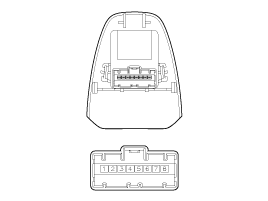
| Inspection |
| 1. |
Ignition "ON" |
| 2. |
Using the scan tool. |
| 3. |
Emit intensive light toward photo sensor using a lamp, and check the output voltage change. |
| 4. |
The voltage will rise with higher intensive light and reduce with lower intensive light.
|
| Replacement |
| 1. |
Disconnect the negative (-) battery terminal. |
| 2. |
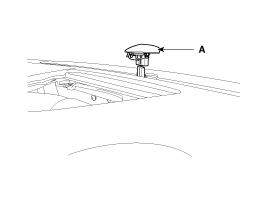
With the (-) driver, remove the photo sensor (A) from the center of defrost nozzle.
|
| 3. |
Install in the reverse order of removal. |
 Photo Sensor Description and Operation
Description
1.
The photo sensor is located at the center of defrost nozzle.
2.
The photo sensor contains a photovoltaic (sensitive to
sunlight) diode. The solar radiation received by its lig ...
 Ambient Sensor Description and Operation
Description
1.
The ambient temperature sensor is located at the front of the
condenser and detects ambient air temperature. It is a negative type
thermistor resistance will increase with lower ...
See also:
Repair procedures
Replacement
•
Be careful not to damage the fender and body.
•
When removing the clips, use a clip remover.
1.
Remove the head lamps.
(Refer to Body Elect ...
Electronic stability control (ESC)
The Electronic Stability Control (ESC) system is designed to stabilize the vehicle
during cornering maneuvers. ESC checks where you are steering and where the vehicle
is actually going.
ESC appli ...
Do not neglect the interior
Moisture can collect under the floor mats and carpeting to cause corrosion. Check
under the mats periodically to be sure the carpeting is dry.
Use particular care if you carry fertilizers, cleaning ...
Categories
Hyundai Azera Manuals

© 2011-2026 Copyright www.hgmanual.com