
 Hyundai Azera: Repair procedures
| Inspection |
Check it by the procedure below to see if the function of the ECM is normal.
| 1. |
Turn the ignition key to the "ON" position. |
| 2. |
Cover the front sensor to stop functioning. |
| 3. |
Shine a light at the rear sensor. |
| 4. |
The ECM should be darkened as soon as the rear sensor detects the light.
|

| 5. |
When the reverse gear is engaged, the ECM should not be darkened. |
| 6. |
When heading lights to both the front and rear sensors, the ECM should not be darkened. |
| Removal |
| 1. |
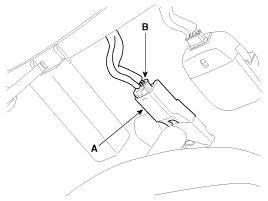
Remove the mirror wiring cover (A) and disconect mirror connector (B).
|
| 2. |
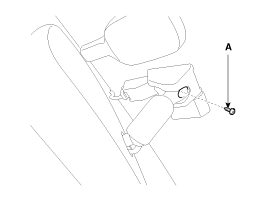
Remove the mounting screw (A).
|
| 3. |
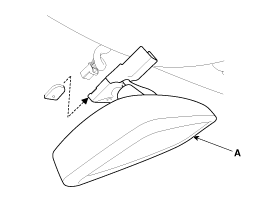
Remove the mirror (A) pulling up in the arrow direction.
|
| Installation |
| 1. |
Install the mirror making sure the mounting bracket not to be damaged. |
| 2. |
Install the mirror wiring cover after reconnecting the connector and tightening the screw.
|
 Description and Operation
Description
The ECM (Electro Chromatic inside rear view Mirror) is for
dimming the reflecting light from a vehicle behind at night, in order
the user not to be dazzled by the light. The forward ...

See also:
ETC (Electronic Throttle Control) System Description and Operation
Description
The Electronic Throttle Control (ETC) System consists of a
throttle body with an integrated control motor and throttle position
sensor (TPS). Instead of the traditional throttle cab ...
Refrigerant label (If equipped)
The refrigerant label is located on the underside of the hood.
The label contains the following information:
Type of refrigerant
Amount of refrigerant
...
Steering wheel remote controller
(1) VOLUME Used to control volume.
(2) SEEK When pressed shortly (under 0.8 seconds).
- FM, AM, XM mode : searches broadcast frequencies saved to presets.
- CD, USB, iPod®, My Music, BT Audio mo ...
Categories
Hyundai Azera Manuals

© 2011-2026 Copyright www.hgmanual.com