
 Hyundai Azera: Using the Room Mirror Key
Fifth generation HG (2011–2026) / Hyundai Azera 2011-2026 Owners Manual / Features of your vehicle / (if equipped) / Using the Room Mirror Key
Hyundai Azera: Using the Room Mirror Key
Fifth generation HG (2011–2026) / Hyundai Azera 2011-2026 Owners Manual / Features of your vehicle / (if equipped) / Using the Room Mirror Key
Selecting the room mirror key will allow you to make service required inquiries, POI info searches, and emergency rescues by connecting to the Blue Link® Center.
Such features can be used only after subscribing to the Blue Link® service.
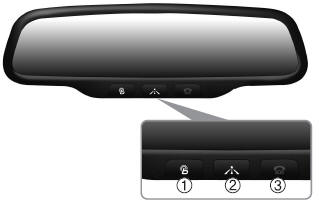
(1)  (Blue Link® Center)
Makes requests for Blue Link® service related inquiries and consultations.
A call is connected to the Blue Link® ser-vice center employee.
Re-pressing the key will end the call. This feature does not operate when you are on a Bluetooth® phone call.
(2)  (Blue Link® for POI)
- Blue Link® for Voice command Starts Blue Link® voice command. Voice receiving voice guidance, shortly press the button to convert to voice command mode. Press and hold the button to end voice command.
- TBT VR Commands
1. Navigate to
“Navigate to� voice command is used to request the download of route data for a new destination, saved destinations, daily routes and previous destinations.
2. Save Destination
“Save Destination� VR command is used to assign a voice tag to the last downloaded destination and store it in a destination directory.
NOTE:
The Turn by Turn(TBT) feature supports the store of ten(10) destinations in the TBT destinations directory.
3. Route Preview
“Route Preview� VR command allows the user to preview the route instructions (upcoming maneuver instructions) at any time during the route guidance.
4. Destinations List
“Destinations List� VR command allows the user to preview and delete the stored destinations with their associated voice tags in the Turn by Turn destinations directory.
5. Voice Guidance
“Voice Guidance� VR command allows the user to mute/unmute the Turn by Turn(TBT) direction announcements.
6. Suspend Route
“Suspend Route� VR command allows the user to suspend and pause Turn by Turn(TBT) route guidance while in the guidance mode.
7. Resume Route
“Resume Route� VR command allows the user to resume Turn by Turn(TBT) route guidance.
(3)  (Blue Link® for SOS)
In the case of an emergency, requests for help to the Blue Link® center.
Call is connected to the Blue Link® emergency rescue center. Re-pressing the key will end the call.
If already on a Bluetooth® phone call, the call will end to connect you to the Blue Link® Emergency Rescue Center.
CAUTION
- You cannot talk simultaneously on the Bluetooth® phone and Blue Link® phone.
- While on a Bluetooth® call, pressing the
 key or
 key will display a message indicating
that you are currently on a call. - A message will be displayed if you receive a Bluetooth® Bluetooth® Wireless
Technology call while already on a Blue Link® call. At this time, press the
 key on the steering wheel remote
controller to accept the call. The phone bell will not ring.
 Blue Link®
Hyundai aims to offer differentiated customer values through a ‘Connected Car
Life,’ which is to provide consumers with fast and reliable IT technology. As consumers’
lifestyles become more an ...
 Eco Coach
• What is Eco Coach?
Every 2.5 minutes, Eco Coach compares your fuel economy against the government
tested average (EPA) or other similar Hyundai models (community), based on your
preference. E ...
See also:
Automatic Transaxle Components and Components Location
Components Location
1. Converter housing2. Automatic transaxle case3. Rear cover4. Valve body cover5. Manual control lever6. Air breather hose7. Inhibitor switch8. Solenoid valve connector
...
Changing tires
1. Park on a level surface and apply the parking brake firmly.
2. Place the transaxle shift lever in P (Park).
3. Activate the hazard warning flasher.
4. Remove the wheel lug nut wrench, jack, ...
Headlight (Headlamp) welcome function
When the headlight is in the ON or AUTO position and all doors (and trunk) are
closed and locked, if you press the door unlock button on the smart key, the headlights
(and/or parking light) will com ...
Categories
Hyundai Azera Manuals
