
 Hyundai Azera: Bluetooth® Wireless Technology Setting
Fifth generation HG (2011–2026) / Hyundai Azera 2011-2026 Owners Manual / Features of your vehicle / Using Bluetooth® Wireless Technology / Bluetooth® Wireless Technology Setting
Hyundai Azera: Bluetooth® Wireless Technology Setting
Fifth generation HG (2011–2026) / Hyundai Azera 2011-2026 Owners Manual / Features of your vehicle / Using Bluetooth® Wireless Technology / Bluetooth® Wireless Technology Setting
Pairing a New Device
Press the ![Select [Phone]](images/books/6/1/page.h470.gif) key
key
![Select [Pair Phone]](images/books/6/1/page.h471.gif) Select [Phone]
Select [Phone]
 Select [Pair Phone]
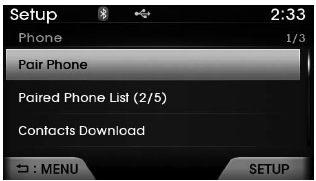
Bluetooth® Wireless Technology devices can be paired with the audio system.
For more information, refer to the “Pairing through Phone Setup� section within Bluetooth® Wireless Technology.
Viewing Paired Phone List
Press the ![Select [Phone]](images/books/6/1/page.h474.gif) key
key
![Select [Paired Phone List]](images/books/6/1/page.h475.gif) Select [Phone]
Select [Phone]
 Select [Paired Phone List]
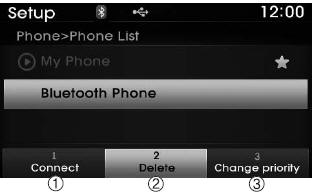
This feature is used to view mobile phones that have been paired with the audio system. Upon selecting a paired phone, the setup menu is displayed.
For more information, refer to the “Setting Bluetooth® Wireless Technology Connection� section within Bluetooth® Wireless Technology.
1) Connect/Disconnect Phone : Connect/ disconnects currently selected phone
2) Delete : Deletes the currently selected phone
3) Change Priority : Sets currently selected phone to highest connection priority
 Contacts
Press the key
Select [Contacts]
The list of saved phone book entries is displayed. Select the
button to download the call history.
1) Contacts List :
-Displays downloaded contacts entries
- ...

See also:
Specifications
Specification
Air Conditioner
ItemSpecificationCompressorType6VSX16Oil type & CapacityFD46XG(PAG OIL) 100±10ccPulley type6PK-TYPEDisplacement160cc/revCondenserHeat rejection14,400 ±5% kcal ...
Rear Door Trim Repair procedures
Replacement
•
Be careful not to scratch the door trim and other parts.
•
Put on gloves to protect your hands.
1.
Using a screwdriver or remover, remove the ...
Oil Filter Body Components and Components Location
Components
1. Oil filter body2. Gasket
...
Categories
Hyundai Azera Manuals
