
 Hyundai Azera: Digital clock (if equipped)
Fifth generation HG (2011–2026) / Hyundai Azera 2011-2026 Owners Manual / Features of your vehicle / Interior features / Digital clock (if equipped)
Hyundai Azera: Digital clock (if equipped)
Fifth generation HG (2011–2026) / Hyundai Azera 2011-2026 Owners Manual / Features of your vehicle / Interior features / Digital clock (if equipped)
WARNING
Do not adjust the clock while driving. You may lose your steering control and cause an accident that results in severe personal injury or death.
Whenever the battery terminals or related fuses are disconnected, you must reset the time.
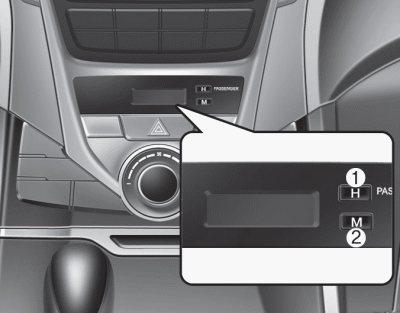
When the ENGINE START/STOP button is in the ACC or ON position, the clock buttons operate as follows:
Hour (1)
Pressing the H button will advance the time display by one hour.
Minute (2)
Pressing the M button will advance the time display by one minute.
Display conversion
To change the 12 hour format to the 24 hour format, press the “H� and “M� buttons at the same time for more than 5 seconds.
For example, if the time is 10:15 p.m., the display will be changed to 22:15.
❈For the type of clock built in the audio or navigation, refer to a separately supplied manual.
 Power outlet
The power outlet is designed to provide power for mobile telephones or other
devices designed to operate with vehicle electrical systems. The devices should
draw less than 10 amps with the engine ...
 Clothes hanger
To use the hanger, pull down the upper portion of hanger.
CAUTION - Hanging clothing
Do not hang heavy clothes, since those may damage the hook. ...
See also:
Oil Cooler Repair procedures
Removal and Installation
1.
Remove the radiator upper hose and lower hose.
(Refer to Engine Mechanical System - "Radiator Hose")
2.
Remove the cooling fan assembly.
(Refer to Engine Mechani ...
Checking the amount of air conditioner refrigerant and compressor lubricant
When the amount of refrigerant is low, the performance of the air conditioning
is reduced. Overfilling also has a negative impact on the air conditioning system.
Therefore, if abnormal operation is ...
Snowy or icy conditions
To drive your vehicle in deep snow, it may be necessary to use snow tires or
to install tire chains on your tires. If snow tires are needed, it is necessary
to select tires equivalent in size and ty ...
Categories
Hyundai Azera Manuals
