
 Hyundai Azera: Roof antenna Repair procedures
Fifth generation HG (2011–2026) / Hyundai Azera 2011-2026 Service Manual / Body Electrical System / AVN System / Roof antenna Repair procedures
Hyundai Azera: Roof antenna Repair procedures
Fifth generation HG (2011–2026) / Hyundai Azera 2011-2026 Service Manual / Body Electrical System / AVN System / Roof antenna Repair procedures
Fifth generation HG (2011–2026) / Hyundai Azera 2011-2026 Service Manual / Body Electrical System / AVN System / Roof antenna Repair procedures
| Removal |
Roof Antenna (GPS)
| 1. |
Remove the rear roof trim.
|
| 2. |
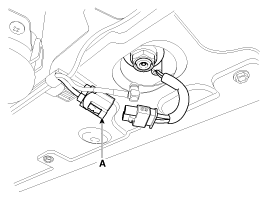
Disconnect the GPS (A) cable from the roof antenna.
|
| 3. |
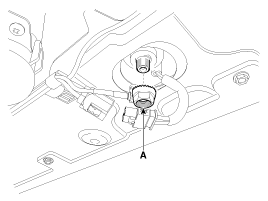
Remove the roof antenna after removing a nut (A).
|
| Installation |
Roof Antenna (GPS)
| 1. |
Installation the roof antenna. |
| 2. |
Connect the GPS cable. |
| 3. |
Install the rear roof trim.
|

 Roof antenna Components and Components Location
Components
...
 Troubleshooting
Troubleshooting
SymptomSuspected areaRepairmentPressing power switch does not turn on systemAVN head unit receiver power source circuitR-2AVN monitorR-15Panel switch does not functionSteering pad ...
See also:
Fuel Tank Pressure Sensor (FTPS) Specifications
Specification
Pressure [kPa (kgf/cm?, psi)]Output Voltage (V)-6.67 (-0.06, -0.97)0.502.5+6.67 (0.068, 0.97)4.5
...
Multimedia Jack Description and Operation
Description
The multimedia jack on the console upper cover is for
customers who like to listen to external portable music players like the
MP3, iPod and etc., through the vehicle's sound system ...
Tire specification and pressure label
The tires supplied on your new vehicle are chosen to provide the best performance
for normal driving.
The tire label located on the driver's side center pillar gives the tire pressures
recomm ...
Categories
Hyundai Azera Manuals

© 2011-2026 Copyright www.hgmanual.com