
 Hyundai Azera: Oil Pump Repair procedures
Fifth generation HG (2011–2026) / Hyundai Azera 2011-2026 Service Manual / Engine Mechanical System / Lubrication System / Oil Pump Repair procedures
Hyundai Azera: Oil Pump Repair procedures
Fifth generation HG (2011–2026) / Hyundai Azera 2011-2026 Service Manual / Engine Mechanical System / Lubrication System / Oil Pump Repair procedures
Fifth generation HG (2011–2026) / Hyundai Azera 2011-2026 Service Manual / Engine Mechanical System / Lubrication System / Oil Pump Repair procedures
| Removal |
| 1. |
Remove the lower oil pan.
(Refer to Lubrication System - "Oil Pan") |
| 2. |
Remove the oil pump chain cover (A).
|
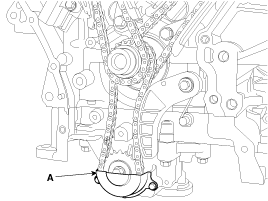
| 3. |
Remove the bolt (A) and then seperate the chain with sprocket from the oil pump.
|
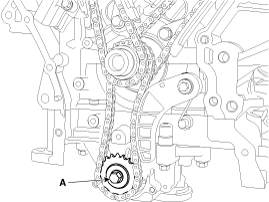
| 4. |
Remove the oil pump (A).
|
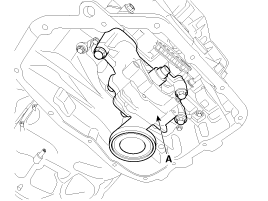

| 5. |
Install in the reverse order of removal. |
| Installation |
| 1. |
Install the oil pump (A).
|
| 2. |
Install the oil pump sprocket and the oil pump chain on the oil pump, and tighten the sprocket bolt (A).
|
| 3. |
Install the oil pump chain cover (A).
|
| 4. |
Install the lower oil pan.
(Refer to Lubrication System - "Oil Pan") |
| 5. |
After assembly, wait at least 30 minutes before filling the engine with oil. |
 Oil Pump Components and Components Location
Components
1. Oil pump2. O-ring3. Oil pump sprocket4. Oil pump chain cover
...
 Oil Pressure Switch Components and Components Location
Components
1. Oil cover2. Oil cover gasket3. Oil pressure switch
...
See also:
Using SEEK
Press the keys to play the previous/next
channel.
❈ If the “Categoryâ€� icon is displayed, channels are changed within the current
category. ...
Parking brake
...
Occupation classification system
Your vehicle is equipped with an occupant classification system in the front
passenger's seat.
The occupant classification system is designed to detect the presence of a properly-seated
front ...
Categories
Hyundai Azera Manuals

© 2011-2026 Copyright www.hgmanual.com