
 Hyundai Azera: Rear Bumper Cover Repair procedures
Fifth generation HG (2011–2026) / Hyundai Azera 2011-2026 Service Manual / Body (Interior and Exterior) / Rear Bumper / Rear Bumper Cover Repair procedures
Hyundai Azera: Rear Bumper Cover Repair procedures
Fifth generation HG (2011–2026) / Hyundai Azera 2011-2026 Service Manual / Body (Interior and Exterior) / Rear Bumper / Rear Bumper Cover Repair procedures
Fifth generation HG (2011–2026) / Hyundai Azera 2011-2026 Service Manual / Body (Interior and Exterior) / Rear Bumper / Rear Bumper Cover Repair procedures
| Replacement |
|

| 1. |
Remove the luggage side trim.
(Refer to "Trunk Trim") |
| 2. |
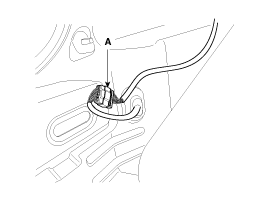
Disconnect the rear bumper main connector (A).
|
| 3. |
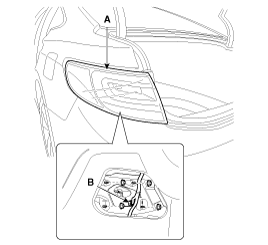
Disconnect the connector (B), and then loosen the rear combination lamp mounting nuts. |
| 4. |
Remove the rear combination lamp (A).
|
| 5. |
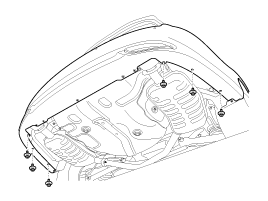
Remove the rear bumper lower mounting clips.
|
| 6. |
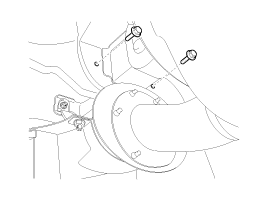
Loosen the mounting bolts.
|
| 7. |
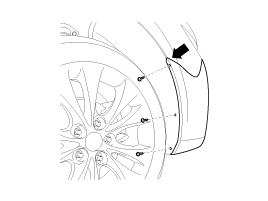
After loosening the rear bumper side's mounting screws, then disconnect the side's.
|
| 8. |
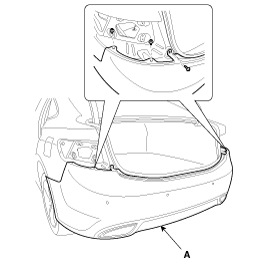
After loosening the mounting screw and clips, then remove the rear bumper cover (A).
|
| 9. |
Installation is the reverse of removal.
|

 Rear Bumper Cover Components and Components Location
Component Location
1. Rear Bumper Cover
...
 Front Seat
...
See also:
Horn
To sound the horn, press the area indicated by the horn symbol on your steering
wheel (see illustration). The horn will operate only when this area is pressed.
Check the horn regularly to be sur ...
Front Seat Shield Outer Cover Repair procedures
Replacement
•
Use a plastic panel removal tool to remove interior trim pieces to protect from marring the surface.
•
Take care not to bend or scratch the trim and ...
Output Speed Sensor Schematic Diagrams
Circuit Diagram
...
Categories
Hyundai Azera Manuals

© 2011-2026 Copyright www.hgmanual.com