
 Hyundai Azera: Steering wheel remote controller
Fifth generation HG (2011–2026) / Hyundai Azera 2011-2026 Owners Manual / Features of your vehicle / Component names and functions / Steering wheel remote controller
Hyundai Azera: Steering wheel remote controller
Fifth generation HG (2011–2026) / Hyundai Azera 2011-2026 Owners Manual / Features of your vehicle / Component names and functions / Steering wheel remote controller
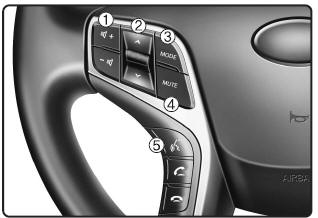
(1) VOLUME Used to control volume.
(2) SEEK When pressed shortly (under 0.8 seconds).
- FM, AM, XM mode : searches broadcast frequencies saved to presets.
- CD, USB, iPod®, My Music, BT Audio mode : changes the track, file.
When pressed and held (over 0.8 seconds).
- FM, AM, XM mode : automatically searches broadcast frequencies and channels.
- CD, USB, iPod®, My Music mode : rewinds or fast forwards the track or file.
(3) MODE
Each time this key is pressed, the mode is changed in order of FM1, FM2, AM, XM1, XM2, XM3, CD, USB(iPod®), AUX, My Music, BT Audio.
If the media is not connected or a disc is not inserted, corresponding modes will be disabled.
Press and hold the key (over 0.8 seconds) to turn the audio system on/off.
When power is off, press the key to turn power back on.
(4) MUTE Mutes audio volume.
(5)  When pressed shortly.
- Starts voice recognition.
- When selecting during a voice prompt, stops the prompt and converts to voice command
waiting state.
When pressed and held (over 0.8 seconds).
- Ends voice recognition.
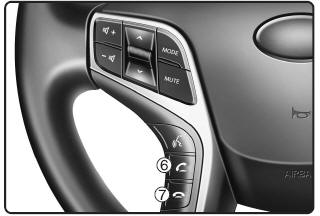
(6) 
When pressed shortly.
- When pressed in the phone screen, displays call history screen.
- When pressed in the dial screen, makes a call.
- When pressed in the incoming call screen, answers the call.
- When pressed during call waiting, switches to waiting call (Call Waiting).
When pressed and held (over 0.8 seconds).
- When pressed in the Bluetooth® Wireless Technology Handsfree wait mode, redials
the last call.
- When pressed during a Bluetooth® Wireless Technology Handsfree call, switches
call back to mobile phone (Private).
- When pressed while calling on the mobile phone, switches call back to Bluetooth®
Wireless Technology Handsfree (Operates only when Bluetooth® Wireless Technology
Handsfree is connected).
(7)
Ends phone call.
 Head Unit
(1) Press to turn power
on/off.
(2) (EJECT)
Press to insert or eject disc. When press and held(3seconds) : energency eject.
(3)
Converts to Radio (FM, AM, XM) mode. Each time this key is pres ...
 Radio mode
...
See also:
Front Seat Belt Pretensioner Components and Components Location
Component Location
1. Front seat belt pretensioner
...
This device complies with Part 15 of the FCC rules.
Operation is subject to the following two conditions:
1.This device may not cause harmful interference, and
2.This device must accept any interference received, including interference that
may caus ...
Battery Repair procedures
Removal and Installation
1.
Remove the air duct (B).
2.
Disconnect the negative terminal (A) from the battery.
Tightening torque :
3.9 ~ 5.9N.m (0.4 ~ 0.6kgf.m, 2.9 ~ 4.3lb-ft)
3.
D ...
Categories
Hyundai Azera Manuals
