
 Hyundai Azera: Repair procedures
| Removal |
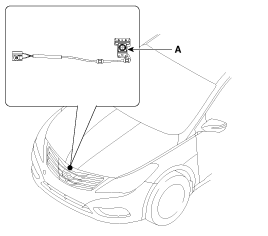
Front View Camera
| 1. |
Remove the front bumper.
|
| 2. |
Loosen 3 screws and disconnect the connector(6 pins). Remove the front view camera(A).
|
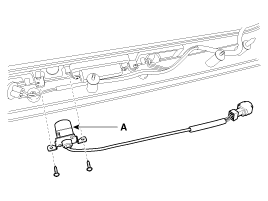
Back View Camera
| 1. |
Open the trunk and remove the rear garnish assembly.
(Refer to Lighting System - "Rear Combination Lamp") |
| 2. |
Disconnect the connector and loosen 2 screws. And remove the back view camera(A).
|
Front View Camera Switch
| 1. |
Disconnect the negative (-) battery terminal. |
| 2. |
Remove the crash pad lower panel in the driver side.
|
| 3. |
Remove the crash pad switch assembly(A) by pushing both clips.
|

| Installation |
Front View Camera
| 1. |
Install the front view camera. |
| 2. |
Install the front bumper. |
Back View Camera
| 1. |
Install the rear view camera. |
| 2. |
Install the rear garnish assembly. |
Front View Camera Switch
| 1. |
Connect the connector and install the side switch assembly. |
 Description and Operation
Description
Front blind camera is a supplemental system that shows blind spot in front of the vehicle through the AV monitor.
The front blind camera will operate when you push the button
and shi ...

See also:
Output Speed Sensor Repair procedures
Inspection
1.
Check signal waveform of Input & output speed sensor using the GDS.
Specification: Refer to "Signal Wave Form" section.
Removal
1.
Remove the battery and the battery ...
INTERIOR LIGHT
CAUTION
Do not use the interior lights for extended periods when the engine is not
running. It may cause battery discharge.
WARNING - Interior light
Do not use the interior lights when driving in ...
Surge Tank Components and Components Location
Components
1. Surge tank2. Surge tank stay
...
Categories
Hyundai Azera Manuals

© 2011-2026 Copyright www.hgmanual.com