
 Hyundai Azera: Drive Belt Repair procedures
Fifth generation HG (2011–2026) / Hyundai Azera 2011-2026 Service Manual / Engine Mechanical System / Timing System / Drive Belt Repair procedures
Hyundai Azera: Drive Belt Repair procedures
Fifth generation HG (2011–2026) / Hyundai Azera 2011-2026 Service Manual / Engine Mechanical System / Timing System / Drive Belt Repair procedures
| Removal and Installation |
| 1. |
Disconnect the battery negative terminal. |
| 2. |
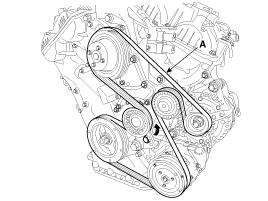
To release the tension, turn the drive belt tensioner counterclockwise then remove the drive belt (A).
|
| 3. |
Installation is reverse order of removal |
 Drive Belt Components and Components Location
Components
1. Drive belt
...
 Idler Components and Components Location
Components
1. Idler
...
See also:
Input Speed Sensor Description and Operation
Description
Input speed sensor is a vital unit that measures the rate of
rotation of the input shaft inside the transaxle and delivers the
readings to the Transaxle Control Module(TCM). The sen ...
Troubleshooting
Troubleshooting
SymptomSuspected areaRepairmentPressing power switch does not turn on systemAVN head unit receiver power source circuitR-2AVN monitorR-15Panel switch does not functionSteering pad ...
Driver Airbag (DAB) Module and Clock Spring Description and Operation
Description
Driver Airbag (DAB) is installed in the steering wheel and
electrically connected to SRSCM via the clock spring. It protects the
driver by deploying the airbag when frontal crash oc ...
Categories
Hyundai Azera Manuals
