
 Hyundai Azera: ENGINE START/STOP button position
Fifth generation HG (2011–2026) / Hyundai Azera 2011-2026 Owners Manual / Driving your vehicle / Engine start / stop button / ENGINE START/STOP button position
Hyundai Azera: ENGINE START/STOP button position
Fifth generation HG (2011–2026) / Hyundai Azera 2011-2026 Owners Manual / Driving your vehicle / Engine start / stop button / ENGINE START/STOP button position
OFF
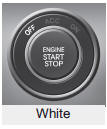
To turn off the engine (START/RUN position) or vehicle power (ON position), press the ENGINE START/STOP button with the shift lever in the P (Park) position. When you press the ENGINE START/STOP button without the shift lever in the P (Park) position, the ENGINE START/STOP button will not change to the OFF position but to the ACC position.
✽ NOTICE
In an emergency situation while the vehicle is in motion, you are able to turn the engine off and to the ACC position by pressing the ENGINE START/STOPbutton for more than 2 seconds or 3 times successively within 3 seconds. If the vehicle is still moving, you can restart the engine without depressing the brake pedal by pressing the ENGINE START/STOP button with the shift lever in the N (Neutral) position.
ACC(Accessory)
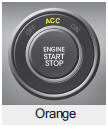
Press the ENGINE START/STOP button while it is in the OFF position without depressing the brake pedal. The electrical accessories are operational.
If the ENGINE START/STOP button is in the ACC position for more than 1 hour, the button turns off automatically to prevent battery discharge.
ON
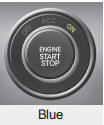
Press the ENGINE START/STOP button while it is in the ACC position without depressing the brake pedal. The warning lights can be checked before the engine is started. Do not leave the ENGINE START/STOP button in the ON position for a long time. The battery may discharge because the engine is not running.
START/RUN

To start the engine, depress the brake pedal and press the ENGINE START/ STOP button with the shift lever in the P (Park) or the N (Neutral) position. For your safety, start the engine with the shift lever in the P (Park) position.
✽ NOTICE
- If you press the ENGINE START/ STOP button without depressing the brake pedal the engine will not start and the ENGINE START/ STOP button changes as follows: OFF ➔ ACC ➔ ON ➔ OFF
- If you leave the ENGINE START/ STOP button in the ACC or ON position for a long time, the battery will discharge.
WARNING
Never press the ENGINE START/ STOP button while the vehicle is in motion. This would result in loss of directional control and braking function, which could cause an accident.
 Illuminated ENGINE START/STOP button (if equipped)
Whenever the front door is opened, the ENGINE START/STOP button will illuminate
for your convenience. The light will go off after about 30 seconds when the door
is closed. It will also go off immedi ...
 Starting the engine
WARNING - Proper footwear
Always wear appropriate shoes when operating your vehicle. Unsuitable shoes
(high heels, ski boots, sandals, etc.) may interfere with your ability to use the
brake and acc ...
See also:
Seat Heater Components and Components Location
Component Location
...
Immobilizer Control Unit Repair procedures
Removal
1.
Disconnect the negative (-) battery terminal.
2.
Remove the crash pad lower panel.
(Refer to Body - "Crash Pad Lower Panel")
3.
Disconnect the connector of the immobilizer unit ...
Description and Operation
Description
When reversing, the driver may have difficult seeing the
blind spots and determine the distance from the object. In order to
provide the driver safety and convenience, back warning ...
Categories
Hyundai Azera Manuals
