
 Hyundai Azera: Front Washer Motor Repair procedures
Fifth generation HG (2011–2026) / Hyundai Azera 2011-2026 Service Manual / Body Electrical System / Windshield Wiper/Washer / Front Washer Motor Repair procedures
Hyundai Azera: Front Washer Motor Repair procedures
Fifth generation HG (2011–2026) / Hyundai Azera 2011-2026 Service Manual / Body Electrical System / Windshield Wiper/Washer / Front Washer Motor Repair procedures
Fifth generation HG (2011–2026) / Hyundai Azera 2011-2026 Service Manual / Body Electrical System / Windshield Wiper/Washer / Front Washer Motor Repair procedures
| Inspection |
| 1. |
With the washer motor connected to the reservoir tank, fill the reservoir tank with water.
|

| 2. |
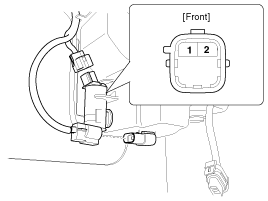
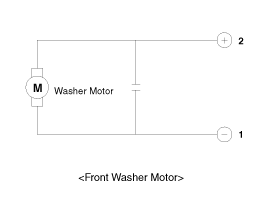
Connect positive (+) battery cables to terminal 1 and negative (-) battery cables to terminal 2 respectively. |
| 3. |
Check that the motor operates normally and the washer motor runs and water sprays from the front nozzles. |
| 4. |
If they are abnormal, replace the washer motor.
|
Washer Fluid Level Sensor Switch
| 1. |
Disconnect the negative(-) battery terminal. |
| 2. |
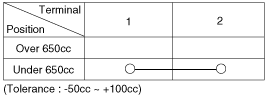
Drain the washer fluid less than 650 cc. |
| 3. |
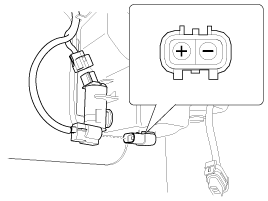
Check for continuity between the No. 1 and No.2 terminal in each float position.
There should be continuity when the float is down.
There should be no continuity when the float is up. |
| 4. |
If the continuity is not as specified, replace the washer fluid level switch.
|
| Removal |
|

| 1. |
Disconnect the negative (-) battery terminal. |
| 2. |
Remove the right tire in the front and wheel cover. |
| 3. |
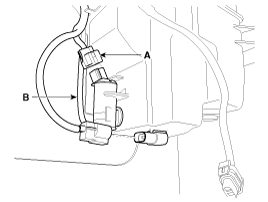
Remove the washer hose (B) and disconnect the washer motor connector (A).
|
| 4. |
Remove the washer motor.
|
| 5. |
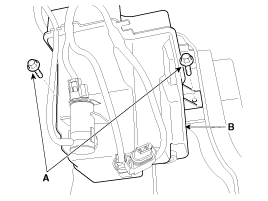
Remove the washer tank (B) after loosening the washer tank mounting bolt (A).
|
| Installation |
| 1. |
Install the washer reservoir.
|
| 2. |
Install the washer motor. |
| 3. |
Install the washer hose. |
| 4. |
Connect the washer motor connector and level sensor connector. |
| 5. |
Install the tire and wheel guide cover. |
| 6. |
Check the washer motor operation. |
 Front Wiper Motor Repair procedures
Removal
1.
Loosen the windshield wiper arm nut (B) after removing a wiper cap (A).
2.
Remove the windshield wiper arm and blade.
3.
If necessary, release the wiper blade fixing clip by pul ...
 Rain Sensor Schematic Diagrams
Circuit Diagram
...
See also:
Troubleshooting
Troubleshooting
Trouble SymptomProbable causeRemedyVehicle pulls to one sideScoring of driveshaft ball jointReplaceWear, rattle or scoring of wheel bearingReplaceTire conicity (rotate tires, repl ...
Checking the coolant level
Check the condition and connections of all cooling system hoses and heater hoses.
Replace any swollen or deteriorated hoses.
The coolant level should be filled between F (Full) and L (Low) marks ...
Positive Crankcase Ventilation (PCV) Valve Repair procedures
Removal
1.
Disconnect the vapor hose (A).
2.
Remove the PCV valve (B).
Inspection
1.
Insert a thin stick (A) into the PCV valve (B) from the threaded side to check that the plunger moves ...
Categories
Hyundai Azera Manuals

© 2011-2026 Copyright www.hgmanual.com