
 Hyundai Azera: General Information
Fifth generation HG (2011–2026) / Hyundai Azera 2011-2026 Service Manual / General Information / Basic Service Symbols / General Information
Hyundai Azera: General Information
Fifth generation HG (2011–2026) / Hyundai Azera 2011-2026 Service Manual / General Information / Basic Service Symbols / General Information
Fifth generation HG (2011–2026) / Hyundai Azera 2011-2026 Service Manual / General Information / Basic Service Symbols / General Information
| Basic Service Symbols |
There are five primary symbols used to complement
illustrations. These symbols indicate the part to apply such materials
during service.
| Symbol | Meaning |
| Do not reuse the part. Replace a new one. |
| Apply engine oil or transmission oil to the part. |
| Apply automatic transmission fluid (ATF) to the part. |
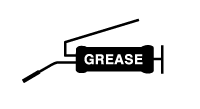
| Apply grease to the part. |
| Apply sealant to the part. |






See also:
Refrigerant line Repair procedures
Replacement
1.
Discharge refrigerant from refrigeration system.
2.
Replace faulty tube or hose.
Cap the open fittings immediately to keep moisture or dirt out of the s ...
Description and Operation
Description
Emissions Control System consists of three major systems.
•
Crankcase Emission Control System prevents blow-by gas from
releasing into the atmosphere. This system recycles gas ...
Brake Booster Repair procedures
Brake Booster Operating Test
For simple checking of the brake booster operation, carry out the following tests.
1.
Run the engine for one or two minutes, and then stop it. If
the pedal depress ...
Categories
Hyundai Azera Manuals

© 2011-2026 Copyright www.hgmanual.com