
 Hyundai Azera: Rear parking assist system (If equipped)
Fifth generation HG (2011–2026) / Hyundai Azera 2011-2026 Owners Manual / Features of your vehicle / Rear parking assist system (If equipped)
Hyundai Azera: Rear parking assist system (If equipped)
Fifth generation HG (2011–2026) / Hyundai Azera 2011-2026 Owners Manual / Features of your vehicle / Rear parking assist system (If equipped)
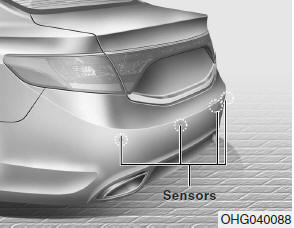
The rear parking assist system assists the driver during reverse movement of the vehicle by chiming if any object is sensed within a distance of 47 in. (120 cm) behind the vehicle. This system is a supplemental system and it is not intended to nor does it replace the need for extreme care and attention of the driver. The sensing range and objects detectable by the back sensors are limited. Whenever backingup, pay as much attention to what is behind you as you would in a vehicle without a rear parking assist system.
WARNING - Rear parking
The rear parking assist system is a supplementary function only. The operation of the rear parking assist system can be affected by several factors (including environmental conditions). To avoid collision with children, pedistrians, objects, or vehicles, it is the responsibility of the driver to always check the area behind the vehicle before and while backing up. Otherwise serious injuries could occur.
- Rear parking assist system OFF button
- Operation of the rear parking assist system
- Non-operational conditions of rear parking assist system
- Rear parking assist system precautions
- Self-diagnosis
 Warnings and indicators (lnstrument cluster)
All warning lights are checked by turning the ignition switch ON (do not start
the engine). Any light that does not illuminate should be checked by an authorized
HYUNDAI dealer. After starting the e ...
 Rear parking assist system OFF button
To turn off the rear parking assist system, push the button (the indicator light
will illuminate). ...
See also:
Wheel replacement
When replacing the metal wheels for any reason, make sure the new wheels are
equivalent to the original factory units in diameter, rim width and offset.
WARNING
A wheel that is not the correct size ...
Brake Pedal Repair procedures
Removal
1.
Turn ignition switch OFF and disconnect the negative (-) battery cable.
2.
Remove the crash pad lower panel.
(Refer to Body - "Crash pad lower panel")
3.
Remove the shower duct ...
Thermostat Troubleshooting
Troubleshooting
SymptomsPossible CausesRemedyCoolant leakage
•
From the thermostat gasket
Check the mounting bolts
•
Check the torque of the mounting bolts
•
Retighten the bo ...
Categories
Hyundai Azera Manuals
