
 Hyundai Azera: Smart key receiver Repair procedures
Fifth generation HG (2011–2026) / Hyundai Azera 2011-2026 Service Manual / Body Electrical System / Smart key System / Smart key receiver Repair procedures
Hyundai Azera: Smart key receiver Repair procedures
Fifth generation HG (2011–2026) / Hyundai Azera 2011-2026 Service Manual / Body Electrical System / Smart key System / Smart key receiver Repair procedures
Fifth generation HG (2011–2026) / Hyundai Azera 2011-2026 Service Manual / Body Electrical System / Smart key System / Smart key receiver Repair procedures
| Removal |
RF Receiver
|

| 1. |
Disconnect the negative(-) battery terminal. |
| 2. |
Remove the rear seat.
|
| 3. |
Remove the rear package tray.
|
| 4. |
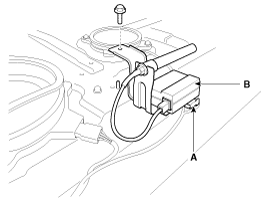
Disconnect the RF receiver connector (A). |
| 5. |
Remove the RF receive (B) after loosening the bolt (1EA).
|
| Installation |
RF Receiver
| 1. |
Install the RF receiver. |
| 2. |
Install the rear package tray. |
| 3. |
Install the rear seat. |
| 4. |
Install the negative (-) battery terminal and check the smart key system. |
 Smart key receiver Specifications
Specification
RF Receiver
ItemsSpecificationFrequency433.92 MHzAntenna typeFSK (Frequency Shift Keying)
...
 Buzzer Repair procedures
Removal
Buzzer
1.
Disconnect the negative(-) battery terminal.
2.
Remove the front left wheel guard.
3.
Remove the external buzzer (A) after disconnecting the connector.
Installation
...
See also:
Pairing a Bluetooth® Wireless Technology Device
What is Bluetooth® Wireless Technology Pairing?
Pairing refers to the process of synchronizing your Bluetooth® Wireless Technology
phone or device with the car audio system for connection. Pairing ...
If the engine stalls at a crossroad or crossing
If the engine stalls at a crossroad or crossing, set the shift lever in the N
(Neutral) position and then push the vehicle to a safe place. ...
Knock Sensor (KS) Schematic Diagrams
Circuit Diagram
...
Categories
Hyundai Azera Manuals

© 2011-2026 Copyright www.hgmanual.com