
 Hyundai Azera: Front Wiper Motor Repair procedures
Fifth generation HG (2011–2026) / Hyundai Azera 2011-2026 Service Manual / Body Electrical System / Windshield Wiper/Washer / Front Wiper Motor Repair procedures
Hyundai Azera: Front Wiper Motor Repair procedures
Fifth generation HG (2011–2026) / Hyundai Azera 2011-2026 Service Manual / Body Electrical System / Windshield Wiper/Washer / Front Wiper Motor Repair procedures
Fifth generation HG (2011–2026) / Hyundai Azera 2011-2026 Service Manual / Body Electrical System / Windshield Wiper/Washer / Front Wiper Motor Repair procedures
| Removal |
| 1. |
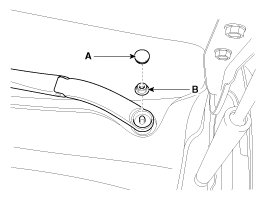
Loosen the windshield wiper arm nut (B) after removing a wiper cap (A).
|
| 2. |
Remove the windshield wiper arm and blade. |
| 3. |
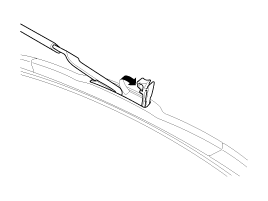
If necessary, release the wiper blade fixing clip by pulling up and remove the wiper blade from the inside radius of wiper arm.
|
| 4. |
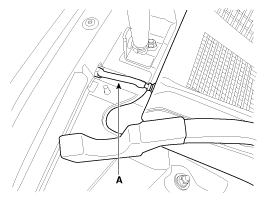
Disconnect the washer hose (A) connected to cowl top cover.
|
| 5. |
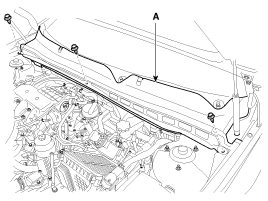
Remove the weather strip and the cowl top cover (A) after removing rivets.
|
| 6. |
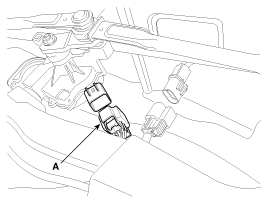
Disconnect the wiper motor connector (A) from the wiper motor & linkage assembly.
|
| 7. |
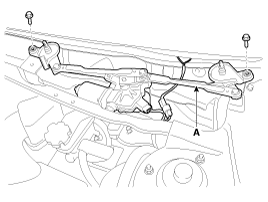
Remove the windshield wiper motor and linkage assembly (A) after removing 2 bolts.
|
| 8. |
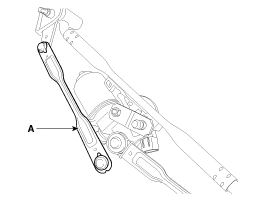
Hold the wiper motor crank arm and remove the upper linkage (A).
|

| 9. |
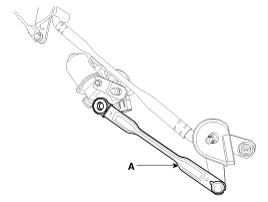
Remove the lower linkage (A) from the wiper motor crank arm.
|
| 10. |
Remove the crank arm (A) after loosening a nut.
|
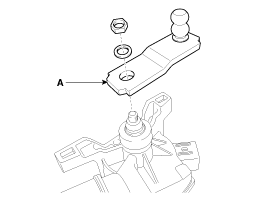
| 11. |
Remove the wiper motor (A) after loosening the bolts.
|
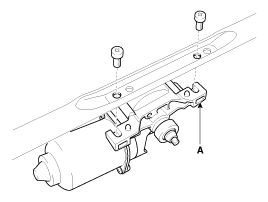
| Installation |
| 1. |
Install the wiper motor. |
| 2. |
Install the crank arm.
|
| 3. |
Install the lower and upper linkage to the wiper motor crank arm. |
| 4. |
Install the wiper motor and linkage assembly and then connect the wiper motor connector.
|
| 5. |
Install the cowl top cover. |
| 6. |
Install the windshield wiper arm and blade.
|

| 7. |
Install the wiper arm and blade to the specified position.
A : Auto stop position (Blade)
|
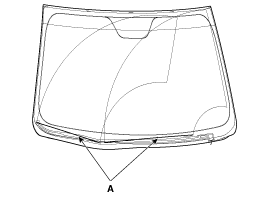
| 8. |
Set the cowl top cover on the specified spray position.
|
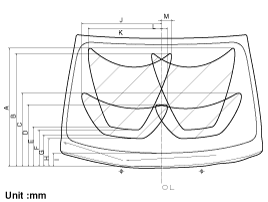
| Inspection |
Speed Operation Check
| 1. |
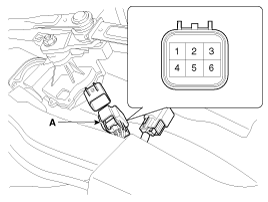
Remove the connector (A) from the wiper motor.
|
| 2. |
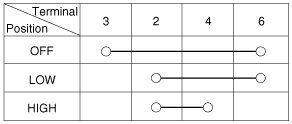
Attach the positive (+) lead from the battery to terminal 2 and the negative (-) lead to terminal 5. |
| 3. |
Check that the motor operates at low or high speed as below table.
|
 Front Wiper Motor Components and Components Location
Component Location
1. Cap2. Nut3. Wiper arm & blade4. Rivet5. Cowl top cover6. Bolt7. Wiper motor & linkage assembly
...
 Front Washer Motor Repair procedures
Inspection
1.
With the washer motor connected to the reservoir tank, fill the reservoir tank with water.
Before filling the reservoir tank with water, check the
filter for ...
See also:
SS-A Solenoid Valve(ON/OFF) Specifications
Specifications
ON/OFF Solenoid Valve(SS-A, SS-B)
? Control type : Normal low type
Control pressure [kpa (kgf/cm?, psi)]490.33(5.0, 71.12) Internal resistance(?)10~11
...
Change to "winter weight" oil if necessary
In some climates it is recommended that a lower viscosity "winter weight" oil
be used during cold weather. See section 8 for recommendations. If you aren't sure
what weight oil you sho ...
Starter Components and Components Location
Component
1 . Front housing2. Planet gear shaft assembly3 . Lever4 . Lever packing5 . Starter solenoid assembly6 . Packing7 . Planet gear 8 . Shield9 . Armature assembly10 . York assembly11 . Br ...
Categories
Hyundai Azera Manuals

© 2011-2026 Copyright www.hgmanual.com