
 Hyundai Azera: Smart key functions
Fifth generation HG (2011–2026) / Hyundai Azera 2011-2026 Owners Manual / Features of your vehicle / Smart key / Smart key functions
Hyundai Azera: Smart key functions
Fifth generation HG (2011–2026) / Hyundai Azera 2011-2026 Owners Manual / Features of your vehicle / Smart key / Smart key functions
1. Door lock
2. Door unlock
3. Trunk open
4. Alarm
With a smart key, you can lock or unlock a door (and trunk) and even start the engine without inserting the key. Refer to the following, for more details.
Using the door and trunk handle switch
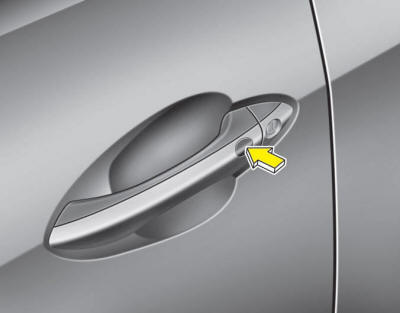
Locking
1. Carry the smart key.
2. Close all doors, engine hood and trunk.
3. Press the switch of the outside door handle.
4. All doors and trunk will lock. The hazard warning lights will blink and the chime
will sound once.
5. Make sure that doors are locked by checking the door lock button inside the vehicle
or pulling the outside door handle.
You can activate or deactivate the Lock Sound (chime sound) function in the vehicle. Refer to "User Settings" in this section.
✽ NOTICE
- The switch will only operate when the smart key is within 28~40 in. (0.7~1 m) from the outside door handle.
- Even though you press the outside door handle switch, the doors will not lock and the chime will sound for 3 seconds if any of following occur: The smart key is in the vehicle. The ENGINE START/STOP button is in ACC or ON position. Any door except the trunk is open.
Unlocking
1.Press the switch of the driver's outside door handle.
2.The driver’s door will unlock. The hazard warning lights will blink and the chime
will sound twice.
3.Press the button once more within 4 seconds.
4.All doors and trunk will unlock and the hazard warning lights will blink and the
chime will sound twice.
You can activate or deactivate the Two Turn Unlock and Unlock Sound (chime sound) function in the vehicle. Refer to "User Settings" in this section.
✽ NOTICE
- The switch will only operate when the smart key is within 28~40 in. (0.7~1 m) from the outside door handle.
- When the smart key is recognized in the area of 0.7~1 m (28~40 in.) from the front outside door handle, other people can also open the door without possession of the smart key.
- After unlocking all doors, the doors will lock automatically unless a door is opened.
Trunk open
1.Carry the smart key.
2.Press the trunk handle switch.
3.The trunk will open.
✽ NOTICE
- Once the trunk is opened and then closed, the trunk will lock automatically when all doors are locked.
- The switch will only operate when the smart key is within 0.7 m (28 in.) from the trunk handle.
 Smart key
...
 Remote keyless entry system operations
Lock (1)
1. Carry the smart key.
2. Close all doors, engine hood and trunk.
3. Press the lock button(1).
4. All doors and trunk will lock. The hazard warning lights will blink and the chime
w ...
See also:
Engine
...
Specifications
Specifications
ItemSpecificationPower sourceDC 14.4V (-) groundFrequency range / Channel spaceFM : 87.5 ~ 108 MHz / 100 KHzAM : 531 ~ 1602 KHz / 9 KHzTuning typePLL SYNTHESIZED TUNINGImpedance2 o ...
Digital clock (if equipped)
WARNING
Do not adjust the clock while driving. You may lose your steering control
and cause an accident that results in severe personal injury or death.
Whenever the battery terminals or relate ...
Categories
Hyundai Azera Manuals
