
 Hyundai Azera: Input Speed Sensor Repair procedures
Fifth generation HG (2011–2026) / Hyundai Azera 2011-2026 Service Manual / Automatic Transaxle System / Automatic Transaxle Control System / Input Speed Sensor Repair procedures
Hyundai Azera: Input Speed Sensor Repair procedures
Fifth generation HG (2011–2026) / Hyundai Azera 2011-2026 Service Manual / Automatic Transaxle System / Automatic Transaxle Control System / Input Speed Sensor Repair procedures
Fifth generation HG (2011–2026) / Hyundai Azera 2011-2026 Service Manual / Automatic Transaxle System / Automatic Transaxle Control System / Input Speed Sensor Repair procedures
| Inspection |
| 1. |
Check signal waveform of Input & output speed sensor using the GDS.
|
| Removal |
| 1. |
Remove the battery and the battery tray.
|
| 2. |
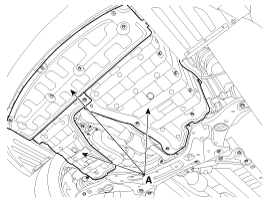
Remove the under cover (A).
|
| 3. |
Replace new gasket and the plug after draining the automatic transaxle fluid by removing the drain plug.
(Refer to Hydraulic System - "Fluid") |
| 4. |
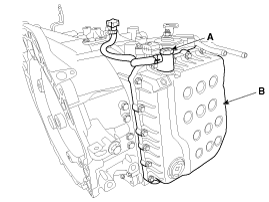
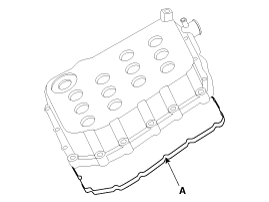
Remove the valve body cover (B) and eyebolt (A).
|


| 5. |
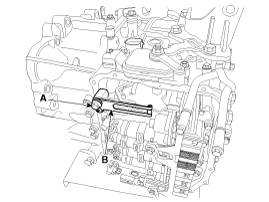
Remove the plate and the detent spring (A) after removing the bolt.
|
| 6. |
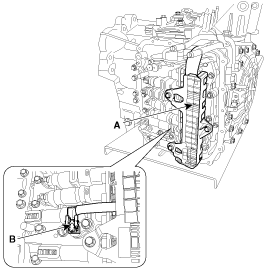
Remove the bolt (3ea) after disconnecting the solenoid valve connector (A) and the oil temperature sensor connector (B).
|
| 7. |
Remove the valve body assembly (A).
|
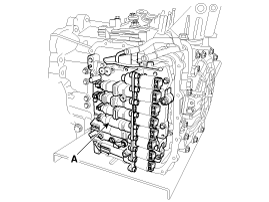
| 8. |
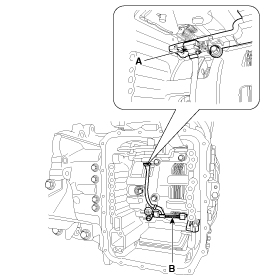
Disconnect the input & output speed sensor connector(A). |
| 9. |
Remove the input & output speed sensor (B) after removing the bolts(2ea).
|
| Installation |
| 1. |
Installation is the reverse of removal. |
After replacement or reinstallation procedure of the input speed sensor, must perform procedures below.
|
 Input Speed Sensor Troubleshooting
Signal Waveform
Fig 1) Input/Output speed sensor at low speed
Fig 2) Input/Output speed sensor at high speed ...
 Output Speed Sensor Description and Operation
Description
The output speed sensor is a vital unit that measures the
rate of rotation of the transaxle's turbine shaft and output shaft, and
delivers the readings to the Transaxle Control Modu ...
See also:
Spark Plug Repair procedures
Removal and Installation
1.
Remove the ignition coils.
(Refer to Ignition System - "Ignition Coil")
2.
Using a spark plug socket, remove the spark plug.
Tightening torque :
14.7 ~ 24.5N. ...
iPod® Mode Menu
If you press the key, you will
have access to the Repeat, Shuffle and List features.
Repeat
Press the key
Select
Repeat Once : Repeats the current song.
Shuffle
Press the key
Sel ...
Using USB Mode
Playing/Pausing USB Files
Once a USB is connected, the mode will automatically start and begin playing
a USB file.
While playing, press the key to
pause and press again to play.
✽ NOTIC ...
Categories
Hyundai Azera Manuals

© 2011-2026 Copyright www.hgmanual.com