
 Hyundai Azera: Rear Assist Arm Repair procedures
Fifth generation HG (2011–2026) / Hyundai Azera 2011-2026 Service Manual / Suspension System / Rear Suspension System / Rear Assist Arm Repair procedures
Hyundai Azera: Rear Assist Arm Repair procedures
Fifth generation HG (2011–2026) / Hyundai Azera 2011-2026 Service Manual / Suspension System / Rear Suspension System / Rear Assist Arm Repair procedures
Fifth generation HG (2011–2026) / Hyundai Azera 2011-2026 Service Manual / Suspension System / Rear Suspension System / Rear Assist Arm Repair procedures
| Replacement |
| 1. |
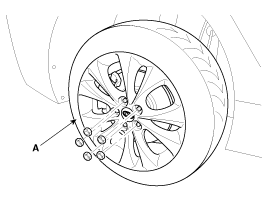
Remove the rear wheel & tire (A).
|

| 2. |
Remove the rear shock absorber.
(Refer to Rear Suspension System - “Rear Shock Absorber�) |
| 3. |
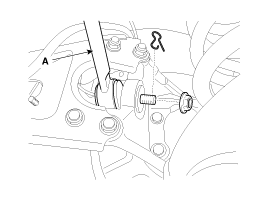
Remove the sprit pin and castle nut and then disconnect the rear assist arm (A) from the rear axle.
|
| 4. |
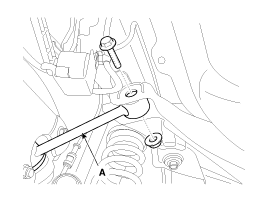
Loosen the bolt & nut and then remove the rear assist arm (A) with the sub frame.
|
| 5. |
Installation is the reverse of removal. |
| 6. |
Check the alignment.
(Refer to Tires/Wheels - “Alignment�) |
| Inspection |
| 1. |
Check the bushing for wear and deterioration. |
| 2. |
Check the rear assist arm for deformation. |
| 3. |
Check ball joint for damage. |
| 4. |
Check for the all bolts and nuts. |
 Rear Stabilizer Bar Repair procedures
Replacement
1.
Remove the rear wheel & tire (A).
Tightening torque:
88.3 ~ 107.9N.m (9.0 ~ 11.0kgf.m, 65.1 ~ 79.6lb-ft)
•
Be careful not to damage to the hub ...
 Trailing Arm Repair procedures
Replacement
1.
Remove the rear wheel & tire.
Tightening torque:
88.3 ~ 107.9N.m (9.0 ~ 11.0kgf.m, 65.1 ~ 79.6lb-ft)
•
Be careful not to damage to the hub bolt ...
See also:
Tire traction
Tire traction can be reduced if you drive on worn tires, tires that are improperly
inflated or on slippery road surfaces. Tires should be replaced when tread wear
indicators appear. To reduce the po ...
Heater & A/C Control Unit(Full Automatic) Repair procedures
Inspection
Self diagnosis
1.
Self-diagnosis process
2.
How to read self-diagnostic code.
After the display panel flickers three times every 0.5
second, the corresponding fault code flicker ...
Display Settings
Adjusting the Brightness
Press the key
Select [Display]
Select [Brightness]
Use ,
keys to adjust the screen brightness
or set the Brightness on Automatic, Daylight, or Nightmode.
select t ...
Categories
Hyundai Azera Manuals

© 2011-2026 Copyright www.hgmanual.com