
 Hyundai Azera: Inside rearview mirror
Fifth generation HG (2011–2026) / Hyundai Azera 2011-2026 Owners Manual / Features of your vehicle / Mirrors / Inside rearview mirror
Hyundai Azera: Inside rearview mirror
Fifth generation HG (2011–2026) / Hyundai Azera 2011-2026 Owners Manual / Features of your vehicle / Mirrors / Inside rearview mirror
Adjust the rearview mirror so that the center view through the rear window is seen. Make this adjustment before you start driving.
Do not place objects in the rear seat or cargo area which would interfere with your vision through the rear window.
Electric chromic mirror (ECM) with HomeLink® system and compass
Your vehicle may be equipped with a Gentex Automatic-Dimming Mirror with a Z-Nav™ Electronic Compass Display and an Integrated HomeLink® Wireless Control System. During nighttime driving, this feature will automatically detect and reduce rearview mirror glare while the compass indicates the direction the vehicle is pointed. The HomeLink® Universal Transceiver allows you to activate your garage door(s), electric gate, home lighting, etc.
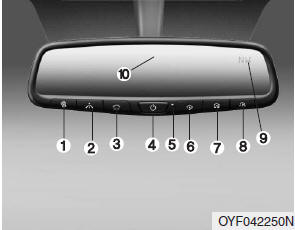
(1) Telematics button
(2) Telematics button
(3) Telematics button
(4) Compass control button & Dimming ON/OFF button
(5) Status indicator LED
(6) Channel 1 button
(7) Channel 2 button
(8) Channel 3 button
(9) Compass display
(10) Rear light sensor
Automatic-Dimming Night Vision Safety™ (NVS®) Mirror
The NVS® Mirror in your vehicle is the most advanced way to reduce annoying glare in the rearview mirror during any driving situation. For more information regarding NVS® mirrors and other applications, please refer to the Gentex website: www.gentex.com
✽ NOTICE
The NVS® Mirror automatically reduces glare during driving conditions based upon light levels monitored in front of the vehicle and from the rear of the vehicle. These light sensors are visible through openings in the front and rear of the mirror case. Any object that obstructs either light sensor will degrade the automatic dimming control feature.
 Mirrors
...
 Automatic-dimming function
Your mirror will automatically dim upon detecting glare from the vehicles traveling
behind you. The autodimming function can be controlled by the Dimming ON/OFF button:
1. Pressing and holding the b ...
See also:
Automatic turn off function (if equipped)
The interior lights automatically turn off approximately 20 minutes after the
ignition switch is turned off.
With the theft alarm system, the interior lights automatically turns off approximately
5 ...
General Information
Towing
If the vehicle needs to be towed, call a professional towing
service. Never tow vehicle with just a rope or chain. It is very
dangerous.
Emergency Towing
There are three popular method ...
Rear Stabilizer Bar Repair procedures
Replacement
1.
Remove the rear wheel & tire (A).
Tightening torque:
88.3 ~ 107.9N.m (9.0 ~ 11.0kgf.m, 65.1 ~ 79.6lb-ft)
•
Be careful not to damage to the hub ...
Categories
Hyundai Azera Manuals
